



15
May
Instant download EAs: maximize trading success in 2026
TL;DR:
- Instant downloads provide traders quick access to expert advisors, enabling rapid setup and broad accessibility.
- However, without proper evaluation, they risk overfitting, false performance expectations, and unforeseen live trading failures.
Instant downloads have changed the game for forex and gold traders. You can purchase an expert advisor (EA), a pre-built automated trading program for platforms like MetaTrader 4 (MT4) or MetaTrader 5 (MT5), and have it running on a live chart within minutes. That speed is genuinely exciting. But the very convenience that makes instant downloads so appealing also creates a dangerous shortcut mentality: many traders assume that fast access equals fast profits. This guide cuts through that illusion, walks you through the real risks of deploying EAs without proper evaluation, and gives you a practical framework for turning instant download tools into genuine trading advantages.
Table of Contents
- How instant download is changing trading
- Common pitfalls of instant EA deployment
- Instant download vs. other ways to access expert advisors
- How to evaluate and optimize your instant download EAs
- Why instant doesn’t mean effortless: A contrarian view
- Ready to boost your trading with proven instant download solutions?
- Frequently asked questions
Key Takeaways
| Point | Details |
|---|---|
| Instant download is fast but risky | Rapid access to EAs and tools is helpful but can hide serious pitfalls if not used with proper testing. |
| Overfitting is a hidden danger | Many instant EAs fail in live trading due to over-reliance on short-term or overfitted backtests. |
| Robust testing saves accounts | Forward testing and significance checks are essential steps after every instant download. |
| Comparison is crucial | Instant downloads, custom coding, and third-party EAs each have unique pros and cons to weigh. |
| Combine access with best practice | The smartest traders use instant tools alongside evaluation frameworks to maximize returns and minimize risk. |
How instant download is changing trading
Not long ago, getting a custom trading robot meant hiring a developer, waiting weeks, and spending thousands of dollars before a single trade was placed. Today, a forex system instant download puts a fully coded, ready-to-run EA in your hands within minutes of payment. That shift is enormous for active retail traders and prop firm participants alike.
What “instant download” actually means in this context is simple: you pay, you receive a file, and you install it directly into your MT4 or MT5 platform. No waiting for a developer. No lengthy license activation process. You can be trading within the same session you made the purchase.
The genuine benefits here are real:
- Speed: Markets move fast, and having access to a new strategy immediately lets you act on current conditions.
- Global access: Traders in any time zone can download tools at 2 a.m. without waiting for business hours.
- Low barrier to entry: Preset systems let traders without coding knowledge participate in automated trading.
- Variety: Hundreds of EAs cover different strategies, currency pairs, risk profiles, and gold-specific setups.
But here is where the illusion creeps in. Instant download can create false expectations about what trading results are realistic. A trader downloads a system, sees a clean equity curve in the product screenshots, and assumes performance will replicate itself in a live account. The reality is that seeing quick setup is not the same as seeing quick profits.
Pro Tip: Treat the download as the starting line, not the finish line. The real work of evaluating, testing, and monitoring the EA begins the moment the file lands in your platform.
Common pitfalls of instant EA deployment
Speed without discipline is where most traders get burned. Understanding the specific failure points of instant EA deployment is critical before you put real capital at risk.
Overfitting is the biggest trap. An overfitted EA has been optimized so perfectly on historical data that it basically “memorizes” past market behavior rather than adapting to real conditions. On a backtest, the equity curve looks flawless. On a live account, the system encounters conditions it has never seen and falls apart. This is not a rare edge case; it is the most commonly reported failure mode in automated trading communities.
“Issues that instant deployment cannot fix include overfitting, insufficient out-of-sample data, and single-period backtest fragility.” source
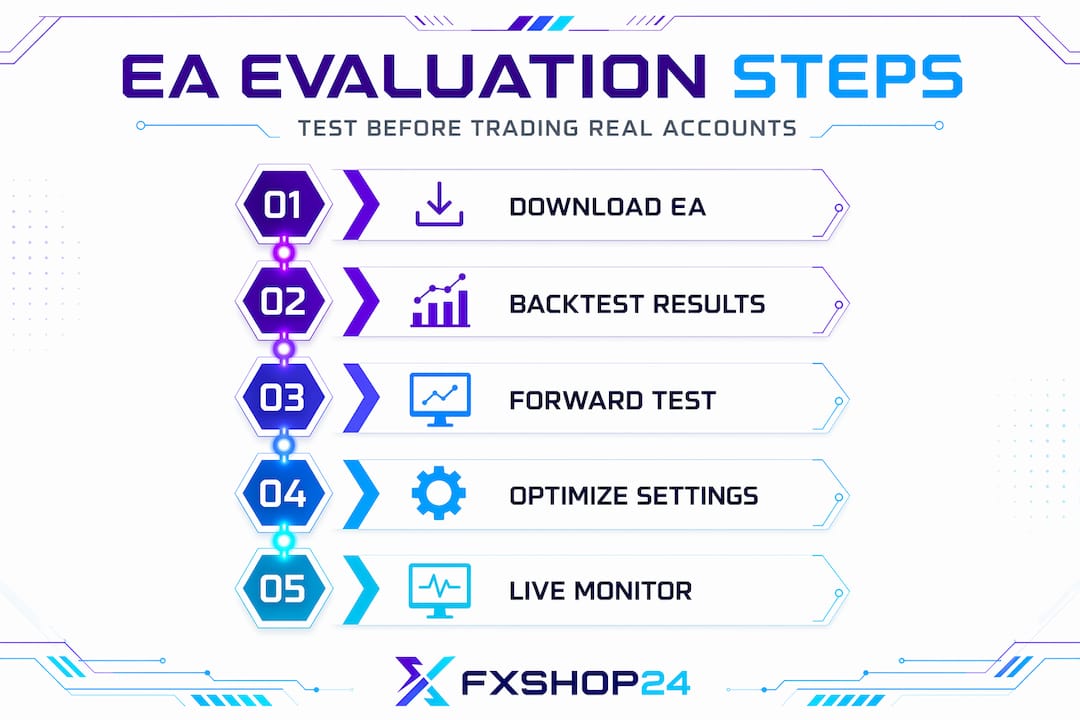
Forward testing is the step most traders skip entirely after instant download. Forward testing means running your EA on a demo account with current, real-time market data for a meaningful period before risking live capital. A minimum of four to eight weeks of forward testing catches problems that even a thorough backtest will miss, including slippage issues, broker-specific quirks, and how the EA behaves during unexpected volatility spikes.
Single-period backtesting creates a false sense of security. If an EA shows great results from 2020 to 2024, that tells you how it performed in specific market conditions during those years. It does not tell you how it handles a 2022-style crypto-correlated selloff, a 2019-style range-bound gold market, or a rapid central bank policy reversal. Robust evaluation needs diverse scenarios, and those scenarios require intentional testing effort.
Here are the most common mistakes traders make post-download, many of which align with patterns documented in trading bot mistakes guides and detailed reviews of forex robot mistakes:
- Skipping demo testing entirely and going straight to live accounts
- Trusting vendor backtest screenshots without running an independent test
- Using default settings without checking if they match your broker’s spread and execution conditions
- Failing to monitor the EA after deployment, assuming it will self-correct
- Ignoring drawdown limits and letting a losing EA run uncontrolled
Pro Tip: When evaluating a downloaded EA, run an independent backtest on your own MT4/MT5 platform using your broker’s tick data, not just the vendor’s provided results. Discrepancies between their results and yours are a red flag worth investigating before depositing a single dollar.
Instant download vs. other ways to access expert advisors
Understanding how instant downloads compare to other EA access methods helps you make smarter decisions about where to invest your time and money.
A single 12 to 24-month testing window may be insufficient for validating trading systems, which is why the method of access and the depth of evaluation both matter enormously.
| Access method | Speed | Customization | Testing depth required | Cost range | Best for |
|---|---|---|---|---|---|
| Instant download EA | Minutes | Low to medium | High | $50 to $500+ | Traders wanting fast deployment |
| Custom-coded EA | Weeks to months | Very high | High | $500 to $5,000+ | Experienced traders with specific strategies |
| Free/community EAs | Hours | Low | Very high | $0 | Experimental or educational use |
| Third-party managed | Days | Medium | Medium | Variable | Traders outsourcing oversight |
Each method has its place. The key insight most traders miss is that how you access an EA has almost nothing to do with how well it will perform. Performance depends entirely on the quality of the underlying strategy and the rigor of your evaluation process.
Here is a practical comparison using a numbered approach:
- Instant download EA: You get speed and convenience, but you must supply all the testing discipline yourself. The vendor has done the coding; evaluation is your responsibility.
- Custom-coded EA: You control every parameter, but you need a developer relationship and a clear strategy brief. Development time means delayed deployment.
- Free or community EAs: These can be legitimate learning tools, but they often come with no support, outdated code, and minimal documentation. The testing burden is entirely yours.
- Third-party managed systems: Slower to set up, but some providers offer verified performance records that reduce your own testing workload.
When you evaluate trading robots across these categories, the consistent finding is that instant downloads are not inherently inferior. They simply require a different kind of trader discipline: one that substitutes careful post-download evaluation for the patience required to build something from scratch.
How to evaluate and optimize your instant download EAs
Proper evaluation is where traders separate themselves from the pack. This is your practical framework for making instant download EAs work reliably.
Proper significance testing and forward testing are essential to avoid curve fit and failure. Here is a step-by-step checklist you can use immediately after downloading any EA:
- Initial check: Read all documentation. Understand the strategy logic, intended market conditions, and recommended settings before touching the platform.
- Independent backtest: Run a minimum 3-year backtest on your own platform using your broker’s data. Compare results to the vendor’s claims.
- Out-of-sample testing: Test the EA on a time period not used in its original optimization. If the vendor tested on 2020 to 2023 data, run your backtest on 2018 to 2019 data to see if results hold up.
- Demo account forward test: Run the EA live on a demo account for at least four weeks in current market conditions. Track every trade.
- Risk parameter review: Check lot sizing, stop-loss settings, and maximum drawdown limits before touching a live account.
- Community and update check: Search for user feedback on the specific EA version you downloaded. Confirm the developer actively maintains and updates the system.
The following table maps evaluation stages to the specific risks they catch:
| Evaluation stage | Risk it addresses | Time required |
|---|---|---|
| Independent backtest | Vendor result manipulation | 1 to 2 hours |
| Out-of-sample test | Overfitting to recent data | 2 to 3 hours |
| Demo forward test | Live execution issues, spread problems | 4 to 8 weeks |
| Risk parameter review | Overleveraging, account blowup risk | 30 minutes |
| Community feedback check | Known bugs, undisclosed failures | 1 hour |
Using both demo and live testing environments is not optional. A demo account catches execution logic errors. A small live account (using minimum lot sizes) catches real broker-specific slippage and execution delays that demo servers often mask.
For deeper optimization strategies, resources on optimizing trading robots and structured backtesting trading robots walk through advanced techniques including walk-forward analysis and Monte Carlo simulation, both of which significantly increase confidence in any EA before scaling up live trading.
Pro Tip: Always check for EA updates within the first week of download. Many developers release critical bug fixes and parameter adjustments after major releases, and running an outdated version can silently harm your results.
Why instant doesn’t mean effortless: A contrarian view
Here is the uncomfortable truth that most trading content avoids: the instant download model has inadvertently trained a generation of traders to skip the hard part. When something arrives fast and feels ready, the human brain treats it as finished. But an EA is not a finished product when it hits your platform. It is a starting point.
We have seen this pattern repeatedly. Community discussions confirm that failure due to curve fit is more common than execution errors. In other words, the robot does exactly what it was programmed to do. It just was not programmed for the market conditions it encountered. That is not a technology failure. It is an evaluation failure.
The traders we see succeed with instant download tools are not the ones with the fastest internet connection or the most EAs downloaded. They are the ones who treat every new download as a hypothesis that needs to be tested, not a solution that has already been proven. They run the demo. They check the out-of-sample data. They read the community forums before deploying at full size.
The automated trading setup guide we recommend is not valuable because it makes setup faster. It is valuable because it builds the habit of structured deployment, which is the actual skill that separates profitable automated traders from frustrated ones.
Speed is a feature. Discipline is the strategy.
Ready to boost your trading with proven instant download solutions?
If this article has made one thing clear, it is that the right combination of fast access and rigorous evaluation is what actually moves the needle in automated trading. At FxShop24, that combination is exactly what we have built our platform around.
Before you explore specific products, we recommend starting with the fundamentals. Understanding why use expert advisors gives you the strategic foundation to choose tools that match your goals. From there, reviewing the full landscape of automated trading systems MT4/MT5 helps you identify the right category for your trading style. And when you are ready to build a complete setup, our guide to key forex trading tools for MT4/MT5 ties it all together. Every EA on FxShop24 comes with instant download access, lifetime updates, and the support infrastructure to help you test and deploy properly.
Frequently asked questions
What is instant download in trading?
Instant download in trading means gaining immediate digital access to trading tools or expert advisors, enabling you to install and use them right after purchase without waiting for manual delivery or activation.
Are instantly downloadable EAs safe to use?
While instant EAs are convenient, many traders face risks such as overfitting and insufficient testing, which can seriously harm results; instant deployment can hide risks like curve fitting if proper evaluation steps are skipped.
How do I avoid common instant download pitfalls?
Always use forward testing and significance checks combined with trial periods on demo accounts before committing serious capital to any instantly downloaded EA.
Why do some instant download trading robots fail in live accounts?
Most failures result from relying on overfitted backtests; curve fit and hidden volatility cause the majority of funded account failures, not execution errors from the robot itself.
Recommended
- Automate Or Die: Why Successful Forex Traders Rely On EAs And Robots For Consistent Gains In 2025 | FxShop24 Marketplace
- Best EA And Algo Strategies For Forex Traders: Riding The October 2025 Trends | FxShop24 Marketplace
- Struggling To Pass Prop Firm Challenges? 7 Proven Prop Firm EA Setups That Actually Work In 2025 | FxShop24 Marketplace
- Top Forex Trading Strategy Examples To Boost Profits In 2026