


5
May
How to backtest trading robots and boost MT4/MT5 results
TL;DR:
- Backtesting evaluates a trading robot’s past performance to gauge its potential for future success, but it is not infallible.
- Proper tools, high-quality data, and a structured process are essential to derive reliable insights from backtesting.
Many traders experience the same gut punch: a strategy that looks brilliant on paper completely falls apart the moment real money enters the equation. You spend weeks refining your Expert Advisor (EA), the backtest numbers look stellar, and then live trading reveals slippage, erratic fills, and drawdowns that were nowhere in the historical report. Backtesting trading robots is the bridge between theoretical promise and live performance, but only when done correctly. This guide walks you through every stage, from setup to interpretation, so you stop losing money on untested assumptions.
Table of Contents
- Understanding backtesting and its importance
- Preparing to backtest: Tools and requirements
- Step-by-step guide to backtesting trading robots
- Interpreting backtest results and optimizing strategies
- Troubleshooting, common mistakes, and best practices
- Rethinking backtesting: What most articles miss
- Take your trading robots further with FxShop24
- Frequently asked questions
Key Takeaways
| Point | Details |
|---|---|
| Backtesting is essential | Testing trading robots with historical data helps you avoid costly mistakes and optimize your strategies efficiently. |
| Use quality tools | MetaTrader 4 and MetaTrader 5 provide robust backtesting environments required for reliable results. |
| Interpret metrics wisely | Analyzing drawdown, win rate, and profit factor is crucial for evaluating trading robot performance. |
| Avoid common pitfalls | Don’t rely on a single backtest, and never curve fit or overlook demo testing before live trading. |
| Leverage expert resources | Follow optimization guides and use curated tools to fine-tune your trading robots for best results. |
Understanding backtesting and its importance
Backtesting is the process of running a trading robot or EA against historical price data to simulate how it would have performed in the past. The core idea is simple: if a strategy worked consistently over five years of historical data, it has a better chance of working in the future. The key word is “chance,” not certainty.
For forex and gold traders specifically, why test trading robots before going live becomes obvious when you consider the volatility of XAU/USD or major currency pairs during news events. A robot that handles calm trending markets might blow up during a Federal Reserve announcement. Backtesting lets you stress-test that robot before it touches your real account.
Here is what backtesting tells you about an EA:
- Whether the strategy has a statistical edge over time
- How deep the account drawdown (the largest peak-to-trough loss) gets during bad periods
- How the robot behaves across different market conditions such as trending, ranging, and volatile sessions
- Whether entry and exit logic fires consistently according to the rules
Important: Backtesting helps identify if an automated trading system is likely to perform well before risking real money. It does not guarantee future profits, but it dramatically narrows the field of candidates.
Understanding the expert advisor benefits starts with knowing that EAs remove emotional decision-making from trading. But emotion-free does not mean error-free. An EA programmed with a flawed logic will execute that flawed logic perfectly, every single time. That is why backtesting is not optional. It is the foundation.
Now that we have seen why backtest results matter, let us examine what you need to begin the process.
Preparing to backtest: Tools and requirements
You cannot run a quality backtest with poor tools or incomplete data. Think of it like trying to review a movie with half the frames missing. The good news is that the barrier to entry is relatively low if you already use MetaTrader.
MetaTrader 4 and MetaTrader 5 are the most popular platforms for backtesting EAs, supporting robust historical testing. MT4 uses the Strategy Tester, while MT5 offers a more advanced tester with multi-currency and multi-threaded optimization capabilities. Both are free to use through any compatible broker.

Here is a breakdown of what you need before running your first backtest:
| Requirement | MT4 | MT5 |
|---|---|---|
| EA file format | .ex4 or .mq4 | .ex5 or .mq5 |
| Historical data source | Built-in or imported | Built-in or imported |
| Optimization support | Single-threaded | Multi-threaded |
| Tick data quality | 90% modeling quality typical | Native tick data available |
| Multi-asset testing | No | Yes |
Before running anything, you need to verify a few essential items:
- Your EA file is compiled and error-free
- Historical data is downloaded for the target pair and timeframe
- The testing period covers at least two to three years of price history
- Your platform is updated to the latest version
Pro Tip: Always download the maximum available historical data from your broker before backtesting. In MT4, go to Tools > History Center and double-click your chosen pair. In MT5, right-click the chart, select “Manage Data,” and download tick data. Stale or incomplete data skews results badly.
For traders who want to build a deeper foundation with the MetaTrader ecosystem, mastering MT4 expert advisors is a strong starting point before running advanced tests. You should also familiarize yourself with forex trading tools MT4 MT5 to understand how indicators and data feeds interact with your EA during testing.
With your tools and setup ready, let us break down the actionable steps for backtesting trading robots.
Step-by-step guide to backtesting trading robots
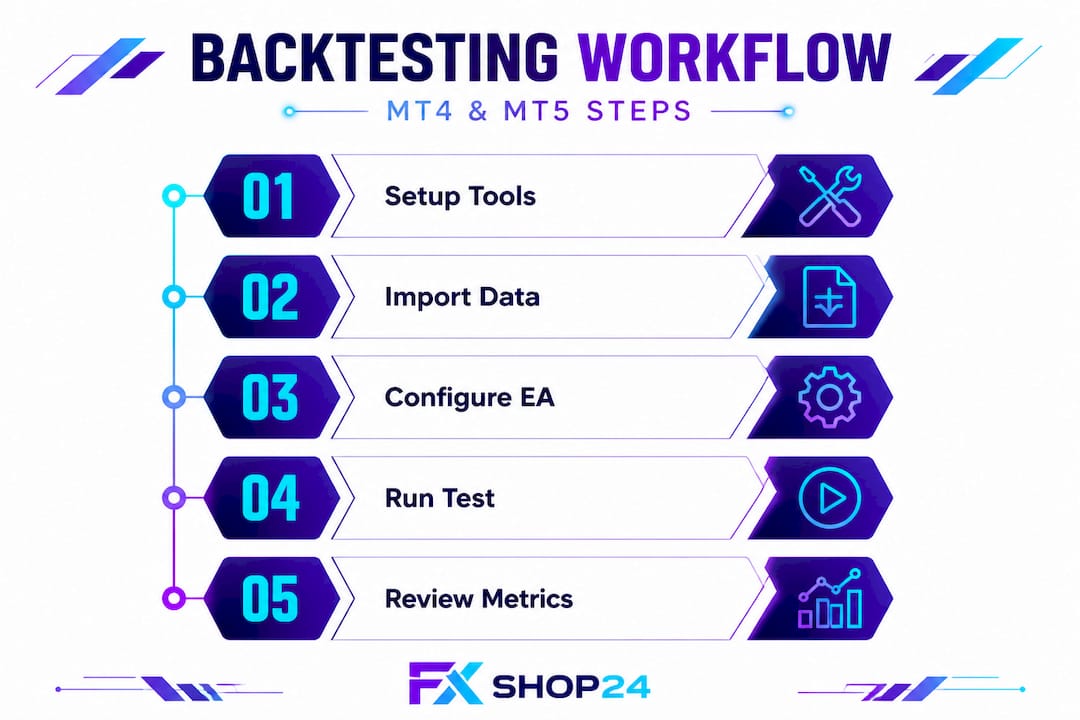
Running a backtest is not just clicking a button and reading numbers. Each step in the process affects the accuracy and usefulness of your results. Following a structured backtesting routine enables traders to identify pitfalls and potential optimizations before live deployment.
Here is the full procedure:
- Open the Strategy Tester. In MT4, press Ctrl+R. In MT5, press Ctrl+R or find it under View > Strategy Tester.
- Select your EA. Use the dropdown menu to choose the compiled EA file you want to test.
- Choose the trading instrument. Select the forex pair or gold (XAUUSD) that the EA is designed for.
- Set the date range. Choose a testing period that covers at least two years, ideally including both trending and ranging market conditions.
- Select modeling quality. In MT4, choose “Every Tick” for the most accurate results. In MT5, use tick data if available.
- Set initial deposit and leverage. Match these settings to your real trading account to get realistic equity curve results.
- Click Start. Let the test run completely without interruption.
- Review the report tab. Look at profit factor, drawdown, number of trades, and the equity curve graph.
Warning: Never judge an EA solely on net profit. A robot with a 200% return but a 70% drawdown is practically untradeable in live conditions. Balance the upside against the risk metrics every single time.
Here is a comparison between MT4 and MT5 backtesting features to help you choose the right environment:
| Feature | MT4 Strategy Tester | MT5 Strategy Tester |
|---|---|---|
| Optimization speed | Slower, single-core | Faster, multi-core |
| Tick data accuracy | Up to 90% | Native tick data |
| Visual testing mode | Yes | Yes |
| Multi-currency testing | No | Yes |
| Cloud optimization | No | Yes |
For a detailed walkthrough of the MT4 process, the MT4 EA backtest guide covers the full five-minute verification method with screenshots. If you prefer MT5, the MT5 backtest tutorial walks through the advanced tick-level testing process step by step.
Completing the process is only half the battle. Let us discuss how to interpret your backtest results so you can make data-driven decisions.
Interpreting backtest results and optimizing strategies
A backtest report is dense with numbers, and most traders stare at it without knowing what actually matters. The careful analysis of metrics like drawdown, win rate, and profit factor is essential for evaluating the viability of trading robots.
Here are the must-check metrics for every trading robot you evaluate:
- Profit factor: The ratio of gross profit to gross loss. Anything above 1.5 is considered acceptable. Above 2.0 is strong. Below 1.2 is borderline.
- Maximum drawdown: The largest percentage drop from a peak in account equity. Keep this below 20% for conservative strategies.
- Win rate: The percentage of trades that close in profit. A 40% win rate can still be profitable if average wins are larger than average losses.
- Consecutive losses: How many losing trades the EA strings together. More than 10 consecutive losses signals fragility.
- Total trades: A backtest with fewer than 200 trades lacks statistical significance. The more trades, the more reliable the sample.
- Equity curve: The visual shape of account growth. A smooth, upward-sloping curve beats a jagged one with violent swings.
Once you have baseline results, you can start optimizing trading robots using the built-in optimizer in both MT4 and MT5. The optimizer runs hundreds or thousands of parameter combinations and ranks them by your chosen metric, usually profit factor or balance.
Walk-forward analysis takes this further. You optimize on one historical segment, then test those optimized parameters on a fresh, unseen segment of data. If results hold up, your EA has genuine robustness. If performance collapses on the fresh data, you are looking at an over-fitted system.
Pro Tip: Never rely on a single backtest. Run your EA across at least three different time periods, two different currency pairs or gold against a currency pair, and multiple timeframes. An EA that only works on one pair during one period is fragile. Real edge shows up consistently across varied conditions.
When it comes to choosing the right EA, strong backtest metrics across diverse conditions are your primary filter. Everything else is secondary.
Now, let us address the missteps and misconceptions that traders frequently encounter during backtesting.
Troubleshooting, common mistakes, and best practices
Even experienced traders make the same backtesting errors repeatedly. Knowing these pitfalls in advance saves you time, money, and frustration.
The biggest errors traders make during backtesting include:
- Using low-quality or incomplete data. Gaps in price data cause false signals and distort results. Always verify data continuity before running tests.
- Curve fitting. This happens when you optimize an EA so heavily for past data that it loses any real predictive power. The EA essentially memorizes history instead of learning from it.
- Ignoring spread and commission. Many traders run backtests with zero spread, which makes results look far better than reality. Always set realistic spread values matching your broker.
- Testing on too short a period. Twelve months of data might look great but could miss a major market event like a currency crisis or flash crash that your EA cannot handle.
- Failing to test across multiple market conditions. An EA that only ran during the 2020 to 2022 bull run in gold may not survive a prolonged sideways or bearish market.
Best practice: Testing with reliable data and avoiding curve fitting ensures results remain as realistic as possible. Document every test you run including date range, parameters used, and results. This creates a paper trail that helps you track improvements and spot regressions.
Here are the best practices every serious trader should follow:
- Keep a backtesting journal with screenshots of each test and its parameters
- Run stress tests by simulating higher spreads and slippage to model worst-case scenarios
- Always follow up a strong backtest with at least four weeks on a demo account before going live
- Cross-reference your backtest with the trading robot optimization guide to verify you are checking every critical parameter
- Review top EA features to understand what distinguishes a well-coded robot from a fragile one
Pro Tip: If your backtest results look too good, they probably are. A profit factor above 3.0 with a drawdown under 5% on years of tick data should raise red flags, not excitement. Investigate whether the EA logic makes genuine market sense or whether it found a quirk in historical data.
After understanding the pitfalls and best practices, let us explore a fresh perspective on why traditional backtesting may not always provide the whole picture.
Rethinking backtesting: What most articles miss
Most backtesting guides stop at “run the test, check the metrics, deploy.” That is incomplete advice. The uncomfortable truth is that backtesting, even done perfectly, is a simulation of a market that no longer exists.
Markets evolve. Liquidity profiles shift. Regulatory changes affect how institutions execute orders. The spread on XAUUSD during the 2018 to 2020 period was structurally different from what it is today. A robot that thrived in that environment might struggle now, not because the logic is wrong, but because the market microstructure changed.
This is why walk-forward testing and live demo trading are not optional extras. They are essential layers of validation that no static backtest can replicate. The traders who consistently profit from automated systems treat backtesting as step one of five, not the final checkpoint.
The testing robots vs live performance gap is real and well-documented. Slippage, partial fills, broker latency, and requotes all exist in live markets but are largely absent in backtesting environments. Smart traders account for this by applying a “live discount” to their backtest metrics. If your robot shows a 1.8 profit factor in backtesting, expect something closer to 1.4 in live trading once real-world friction is applied.
The most dangerous trader is the one who runs one backtest, sees a great-looking equity curve, and immediately goes live with full position sizing. Confidence built on a single data point is not confidence. It is overconfidence with a timer attached.
Use backtesting to eliminate bad candidates quickly. Then use demo testing, walk-forward analysis, and small live positions to build genuine confidence in the robots that survive. That layered approach is what separates consistently profitable automated traders from those who blow accounts on promising-looking EAs.
Take your trading robots further with FxShop24
If you are serious about running automated forex and gold strategies, having access to well-built, pre-tested EAs dramatically shortens the learning curve.
At FxShop24, we offer a curated marketplace of trading robots built and verified for MT4 and MT5. Every EA in our catalog comes with backtesting documentation, optimization guidance, and lifetime updates, so you are not starting from scratch. Whether you want to evaluate trading robots before buying or follow a step-by-step optimizing trading robots process to sharpen an EA you already own, we have the tools and resources to support every stage of your automation journey. Explore the full range of prop-firm-compatible EAs, download instantly, and start backtesting today.
Frequently asked questions
What is the best platform for backtesting trading robots?
MetaTrader 4 and MetaTrader 5 are the most popular platforms for backtesting EAs, offering robust features for historical data analysis and strategy optimization. MT5 provides additional speed and multi-asset testing capabilities over MT4.
How can I ensure my backtest results are reliable?
Use high-quality historical data, avoid curve fitting by testing on multiple unseen data segments, and always verify results with demo trading before going live. Testing with reliable data and avoiding curve fitting ensures results remain as realistic as possible.
What are key metrics to evaluate in a backtest report?
Drawdown, profit factor, win rate, and consistency across different time periods are the most critical indicators. Careful analysis of these metrics is essential for evaluating the viability of any trading robot.
Can backtesting guarantee live trading success?
No, backtesting provides valuable insight but real market conditions including slippage, liquidity shifts, and broker latency affect actual outcomes. Backtesting helps identify if a system is likely to perform well, but it is not a guarantee of future profitability.
Recommended
- How To Backtest An Expert Advisor On MT5: Step-by-Step For Beginners | FxShop24 Marketplace
- How To Evaluate Trading Robots For Profitable Results
- How To Backtest Your MT4 EA In 5 Minutes (Complete Verification Guide) | FxShop24 Marketplace
- Step-by-Step Guide: How To Run A Backtest On MetaTrader 4 (MT4) | FxShop24 Marketplace
- Top benefits of algorithmic trading for scalpers