

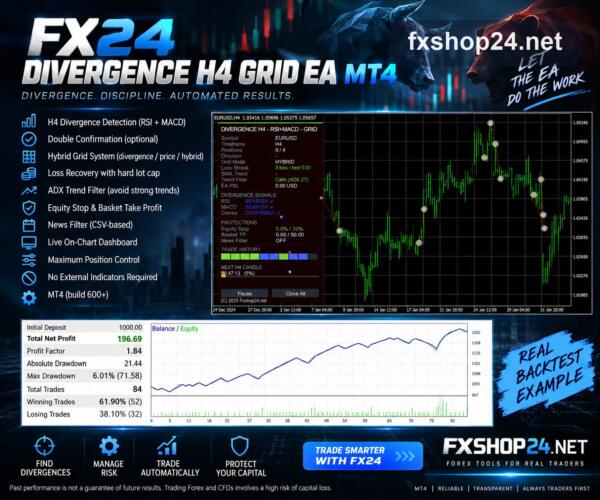

FX24 Divergence H4 Grid EA MT4
$0.00
EURUSD H4 is a free tool for analyzing the EUR/USD currency pair.
Original Product
Setfiles*
- Description
- Reviews (0)
Description
This Expert Advisor was developed by the FXShop24 team. You receive full assistance, official support and updates directly from us. Read our pre-purchase testing guide before running it live.
FX24 Divergence H4 Grid EA MT4
FX24 Divergence H4 Grid EA MT4 is an original MetaTrader 4 trading tool developed by the FXShop24 team, with full support and updates included — instant download and recommended setfiles included. Test it on demo, verify it on your broker, then decide with real data.
What It Is
An automated trading tool developed by the FXShop24 team for MetaTrader 4 and ready to run on your terminal in minutes.
Who It's For
Traders who understand averaging systems and their tail risk, size positions conservatively and always watch a full grid cycle on demo before going live.
What's Included
The product file, recommended setfiles, a step-by-step installation guide and access to live support for setup questions.
Guarantee
Original FXShop24 product with full support, instant download right after purchase and our refund policy.
About FX24 Divergence H4 Grid EA MT4
FX24_Divergence_H4_Grid_EA_MT4 — FREE Download (MT4)
© fxshop24.net — https://fxshop24.net
Free Expert Advisor released by the fxshop24 channel.
What it does
- FX24_Divergence_H4_Grid_EA_MT4tool analyzes the EUR/USD currency pair.
- It provides insights based on historical data and market trends.
- Users can access the tool through the FXShop24 Telegram channel for free.
Key features
- Currency Pair: Focused on EUR/USD
- Timeframe: Operates on H4 (4-hour) intervals
- Market Analysis: Uses historical data for insights
- Free Access: Available through the FXShop24 Telegram channel
- User-Friendly: Designed for easy navigation and understanding
In the package
- EURUSD H4 Tool
How to install
- Download the EURUSD H4 tool file from the FXShop24 Telegram channel.
- Open your MT4 platform.
- Go to ‘File’ and select ‘Open Data Folder.’
- Navigate to the ‘MQL4’ folder, then to ‘Indicators.’
- Copy the downloaded file into the ‘Indicators’ folder.
- Restart your MT4 platform to complete the installation.
Risk disclaimer
Trading leveraged products carries a high level of risk. Past performance is not indicative of future results. This software is provided “as is” — always test on a demo account first.
© fxshop24.net — https://fxshop24.net — Free distribution. Resale or removal of the copyright notice is not permitted.
Archive password: fxshop24.net (the archive is encrypted — open it with 7-Zip or WinRAR).
Technical Specifications
| Platform | MetaTrader 4 |
| Categories | Free EA, MT4, Expert Advisors MT4, FXShop24 Exclusive EAs |
| Strategy | Grid & Martingale |
| Setfiles | Included |
| Version | Latest release |
| Delivery | Instant download after checkout |
| Refund Policy | 7 days |
Frequently Asked Questions
Is this an official FXShop24 product?
Yes — this Expert Advisor was developed by the FXShop24 team. You receive full assistance, official support and updates directly from us.
How and when do I receive it?
Immediately after checkout: the download link becomes available and you also receive a confirmation email. If anything is missing, contact live support and we will sort it out quickly.
Are setfiles and instructions included?
Yes — the product ships with recommended setfiles and a step-by-step installation guide, so you can go from download to a running terminal in minutes.
What if it does not work with my broker?
Reach out to support before going live: we will help you verify symbol names, account type and settings. And if the product still does not fit your setup, you are covered by our 7-day refund policy.
Ready to automate your trading?
Instant download · Setfiles included · Live support · 7-day refund policy




Reviews
There are no reviews yet.