




TOTHEMOON MT4 V3.5 + SETFILES
$19.00
ToTheMoon MT4 is an automated Grid Expert Advisor that manages positions through average-price entries, progressive lot sizing, and price-recovery exits. It supports partial loss closing and Multi-Symbol management, with the strategy suited to instruments that tend to move within ranges and experience regular retracements.
Important Notice:
This EA is currently intended for demo accounts only. Please consider this carefully before purchasing.
Original Product

Setfiles*
- Description
- Additional information
- Reviews (0)
Description
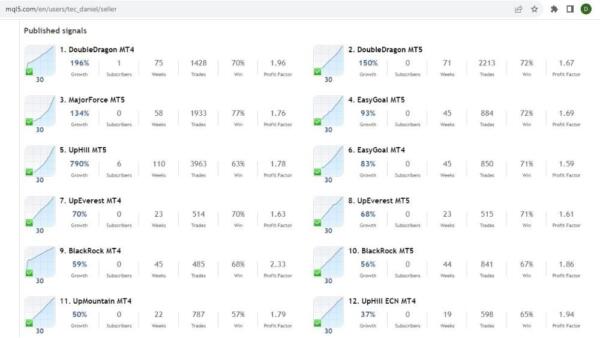
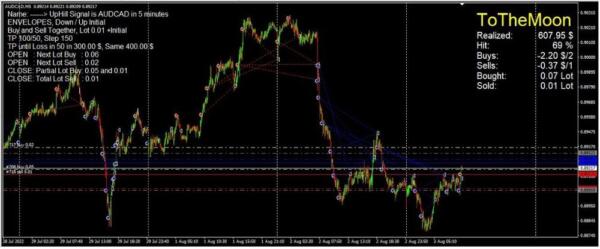
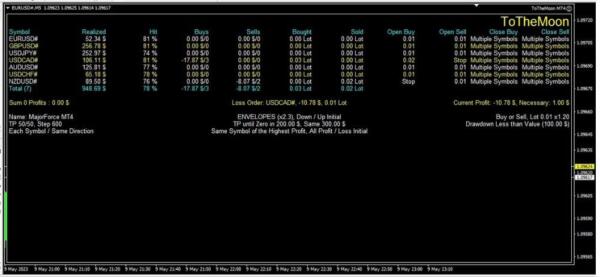
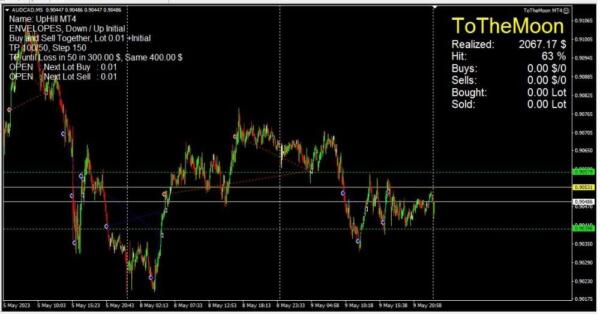
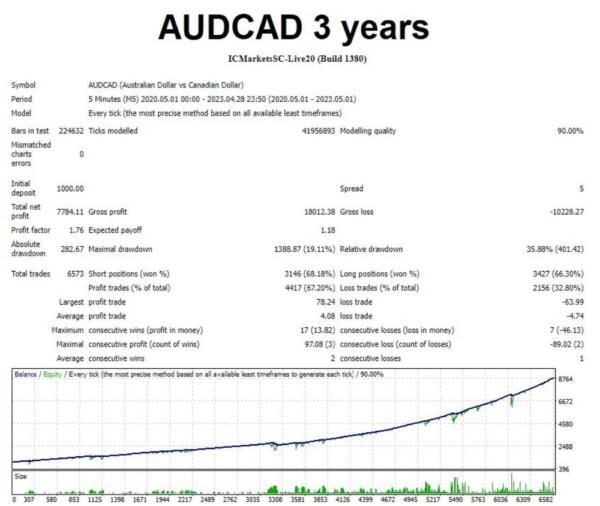
This is a third-party product supplied as an unlocked version for testing and evaluation. It may differ from the original licensed version in functionality, compatibility, updates and support. Images and performance reports come from the original developer and are not independently verified. No EA guarantees profits — test on a demo account for at least 72 hours. Read the full pre-purchase guide
TOTHEMOON MT4 V3.5 + SETFILES — V3.5
TOTHEMOON MT4 V3.5 + SETFILES is a MetaTrader 4 trading tool supplied as an unlocked version for testing and evaluation — instant download and recommended setfiles included. Test it on demo, verify it on your broker, then decide with real data.
What It Is
A trading tool for MetaTrader 4, supplied as unlocked files for testing and evaluation, ready to run in minutes.
Who It's For
Traders who want hands-free execution and are willing to validate the tool on a demo account before scaling into live risk — the professional way to adopt any EA.
What's Included
The product file, recommended setfiles, a step-by-step installation guide and access to live support for setup questions.
Guarantee
Instant download right after purchase and a refund policy for defective or nonfunctional products — test everything on demo first.
About TOTHEMOON MT4 V3.5 + SETFILES
INTRODUCING TOTHEMOON
ToTheMoon MT4 is an automated Grid Expert Advisor that manages positions through average-price entries, progressive lot sizing, and price-recovery exits. It supports partial loss closing and Multi-Symbol management, with the strategy suited to instruments that tend to move within ranges and experience regular retracements.
Vendor website: https://www.mql5.com/en/market/product/97963
Key Takeaways
- Progressive Lot Management: Increases position size as price moves against the trade and closes positions during market retracements.
- Loss Management: Uses partial position closures to manage exposure and limit drawdown.
- Multi-Symbol Strategy: Manages positions across multiple instruments, suited to markets with lower volatility and frequent retracements.
TOTHEMOON Features
- Trading Platform: MetaTrader 4 (MT4)
- Timeframe: M5 (5-minute chart)
- Instruments: Forex, Indices, Metals, Cryptocurrencies & Stocks
- Minimum Deposit: $100
- Minimum Leverage: 1:100
- Account Type: Any
Archive password: fxshop24.net (the archive is encrypted — open it with 7-Zip or WinRAR).
How ToTheMoon’s grid logic works
ToTheMoon MT4 is an automated Grid Expert Advisor for the M5 timeframe. It opens an initial position and, as price moves against it, adds further entries at predefined intervals with progressively larger lot sizes, building an average-price basket. When price retraces back through the average entry, the basket closes in profit. The strategy is designed for instruments that spend long periods moving sideways within ranges and retracing regularly — conditions where breakout systems often get chopped up.
Loss management and multi-symbol trading
Besides classic take-profit exits on the basket, ToTheMoon supports partial position closures to cut exposure when the market keeps moving against the grid, limiting how far drawdown can develop. The Multi-Symbol mode manages baskets across several instruments at once, diversifying the exposure instead of concentrating it in a single chart.
Understanding the risks of grid trading
Grid systems are honest about one thing: they trade small, frequent wins against the possibility of a large loss when price trends strongly in one direction without retracing. Progressive lot sizing amplifies both sides of that equation. Before running ToTheMoon on a live account, test it on demo with the exact setfiles you intend to use, keep the overall account exposure within your drawdown tolerance, and avoid running it uncapped during high-impact news or strong one-way trends.
Frequently asked questions about ToTheMoon
Which platform do I need?
MetaTrader 4. The M5 timeframe is recommended, and the EA works on Forex, indices, metals, cryptocurrencies and stocks. Minimum deposit is $100 with leverage of at least 1:100. The archive is password-protected with fxshop24.net — open it with 7-Zip or WinRAR.
What is included in the download?
The ToTheMoon EA version 3.6 for MT4 plus the ready-made setfiles for the supported instruments. Install the EA in the Experts folder, load the setfile matching your instrument, and attach it to an M5 chart.
Does ToTheMoon use martingale?
It uses progressive lot sizing typical of grid strategies — position size increases as price moves against the basket. It is not a classic martingale on individual trades, but the compounding exposure carries similar risk characteristics and should be sized accordingly.
Can I use it on a prop firm account?
Grid EAs are generally a poor fit for prop firm drawdown rules, because a strong one-way move can breach daily loss limits before the grid recovers. Most traders restrict grid strategies to personal accounts where they control the risk budget.
Related products
Browse more MT4 Expert Advisors, or if you prefer non-grid strategies take a look at Walex EA MT5 for a support/resistance approach without martingale or grid.
Technical Specifications
| Platform | MetaTrader 4 |
| Categories | Expert Advisors MT4 |
| Setfiles | Included |
| Version | V3.5 |
| Delivery | Instant download after checkout |
| Refund Policy | 7 days |
Frequently Asked Questions
Is this an original licensed product?
No — we supply unlocked versions for testing and evaluation, which may differ from the original licensed versions in functionality, compatibility, updates and support. For official licensing and developer support, purchase from the original developer. Read our pre-purchase guide for full details.
How and when do I receive it?
Immediately after checkout: the download link becomes available and you also receive a confirmation email. If anything is missing, contact live support and we will sort it out quickly.
Are setfiles and instructions included?
Yes — the product ships with recommended setfiles and a step-by-step installation guide, so you can go from download to a running terminal in minutes.
What if it does not work with my broker?
Reach out to support before going live: we will help you verify symbol names, account type and settings. And if the product still does not fit your setup, you are covered by our 7-day refund policy.
Ready to automate your trading?
Instant download · Setfiles included · Live support · 7-day refund policy
Additional information
| pa_info | DLL, EA |
|---|---|
| pa_manual | No |
| pa_platform | Metatrader 5 |
| pa_pair | Any Pair |
| pa_preset | Yes |
| pa_timeframe | M5 |





Reviews
There are no reviews yet.