




LTMS Legend Trade Management System v11.3
$28.60
- Title: LTMS Legend Trade Management System v11.3
- Content: Includes expert advisors, indicators, libraries, DLL file, MT4 root folder files, license key, instructions, and videos.
- Important Notice: Installation is significantly more complex than other MT4 products.
- Requirement: Please only purchase if you can follow the installation steps, including disabling antivirus software.
- Step 1: Turn off antivirus software before downloading the file.
- Step 2: Download the file and extract its contents.
- Step 3: Copy DLL folder files to MT4 root folder.
- Step 4: Start terminal using a new launcher provided.
- Step 5: Follow instructions and enter the license key.
- Step 6: Place Fixacc.dll in the library folder and attach Fixacc.ex4 to the chart before using LTMS 11.
Original Product
Setfiles*
- Description
- Discussion (0)
Description
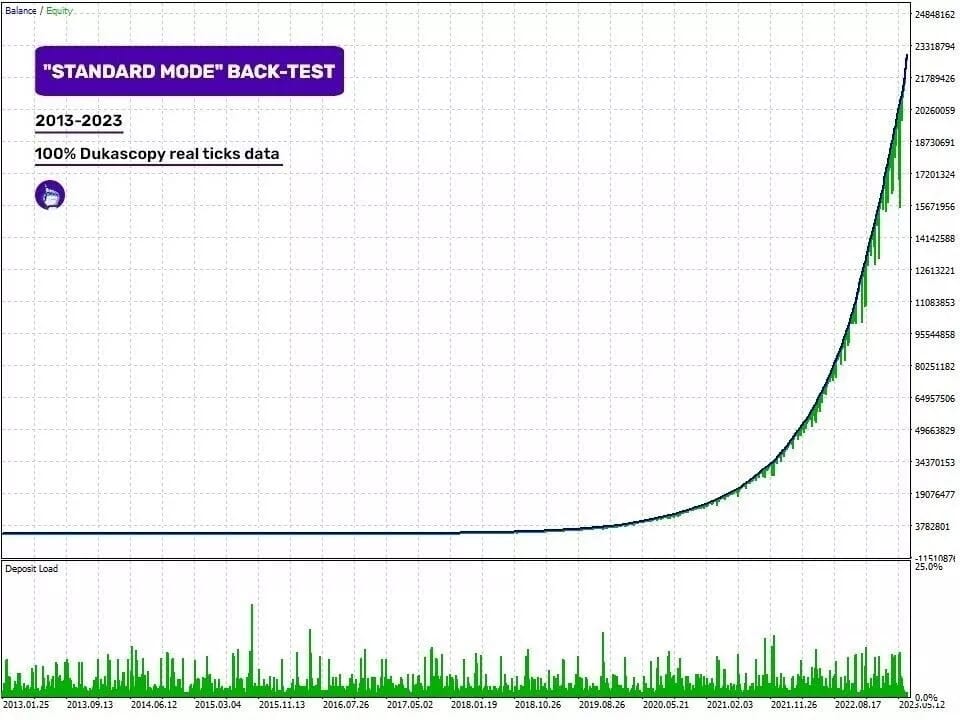
This is a third-party product supplied as an unlocked version for testing and evaluation. It may differ from the original licensed version in functionality, compatibility, updates and support. Images and performance reports come from the original developer and are not independently verified. No EA guarantees profits — test on a demo account for at least 72 hours. Read the full pre-purchase guide
LTMS Legend Trade Management System v11.3 — V11.3
LTMS Legend Trade Management System v11.3 is a MetaTrader trading tool supplied as an unlocked version for testing and evaluation — instant download and recommended setfiles included. Test it on demo, verify it on your broker, then decide with real data.
What It Is
A trading tool for MetaTrader, supplied as unlocked files for testing and evaluation, ready to run in minutes.
Who It's For
Traders who want hands-free execution and are willing to validate the tool on a demo account before scaling into live risk — the professional way to adopt any EA.
What's Included
The product file, recommended setfiles, a step-by-step installation guide and access to live support for setup questions.
Guarantee
Instant download right after purchase and a refund policy for defective or nonfunctional products — test everything on demo first.
About LTMS Legend Trade Management System v11.3
LTMS Legend Trade Management System v11.3: A Comprehensive Guide to Installation and Usage
Welcome to the world of algorithmic trading with the LTMS Legend Trade Management System v11.3. This advanced trading tool offers experts, indicators, libraries, DLL files, MT4 root folder files, license keys, and instructional videos to enhance your trading experience. However, before diving into the features and benefits of this product, it’s crucial to understand the installation process and take necessary precautions.
Important Installation Note
Please be aware that the installation of the LTMS Legend Trade Management System v11.3 is significantly more complex than other regular MT4 products. It requires technical knowledge and careful follow-through of the steps outlined below.
Step-by-Step Installation Guide
- Step 1: Disable Antivirus Software
- Step 2: Download and Extract the Files
- Step 3: Copy DLL Files to MT4 Root Folder
- Step 4: Start Terminal with Launcher
- Step 5: Enter License Key
- Step 6: Attach Fixacc.dll to Library Folder
Before downloading the file, make sure to temporarily disable your antivirus software. This is necessary because the trading robot uses a custom DLL file, which some antiviruses may block and flag as a virus. Although this is a false alarm, it’s essential to allow the DLL file for the advisor to function properly.
Once your antivirus software is disabled, download the LTMS Legend Trade Management System v11.3 file and extract it to a suitable location on your computer.
Locate the DLL folder within the extracted files and copy all the files into the root folder of your MT4 platform. This step is crucial for the system to recognize and utilize the DLL files.
To ensure compatibility, it is necessary to start the MT4 terminal using a new launcher. This launcher is specifically designed to work with the LTMS system.
Follow the information provided in the image (DLL – start terminal with launcher.jpg) to enter the license key. This step activates the LTMS Legend Trade Management System and grants you full access to its features.
To complete the installation process, copy the Fixacc.dll file into the library folder of your MT4 platform. Additionally, attach Fixacc.ex4 to the chart before attaching the LTMS 11 expert advisor.
By following these steps, you will successfully install the LTMS Legend Trade Management System v11.3 on your MT4 platform. Remember to re-enable your antivirus software after completing the installation process.
Exploring the Features and Benefits
The LTMS Legend Trade Management System v11.3 offers a wide range of features and benefits for traders, including:
- Expert Advisors: Automate your trading strategies with the included expert advisors, allowing you to execute trades based on predefined rules.
- Indicators: Enhance your technical analysis with a variety of indicators, providing valuable insights into market trends and price movements.
- Libraries: Expand the functionality of your trading platform with custom libraries, enabling advanced algorithmic trading techniques.
- DLL Files: The system utilizes custom DLL files, which are essential for the execution of specific trading algorithms and strategies.
- MT4 Root Folder Files: Ensure seamless integration with your MT4 platform by copying the necessary files into the root folder.
- License Key: Activate the full potential of the LTMS system by entering the provided license key.
- Instructional Videos: Learn how to navigate and utilize the system effectively through the included instructional videos.
With the LTMS Legend Trade Management System v11.3, traders can automate their trading strategies, gain valuable market insights, and execute trades efficiently. Whether you are a beginner or an experienced trader, this advanced trading tool can significantly enhance your trading journey.
So, if you are ready to take your trading to the next level and are able to follow the installation steps mentioned above, the LTMS Legend Trade Management System v11.3 is the perfect solution for you.
Technical Specifications
| Platform | MetaTrader |
| Categories | Expert Advisor |
| Setfiles | Included |
| Version | V11.3 |
| Delivery | Instant download after checkout |
| Refund Policy | 7 days |
Frequently Asked Questions
Is this an original licensed product?
No — we supply unlocked versions for testing and evaluation, which may differ from the original licensed versions in functionality, compatibility, updates and support. For official licensing and developer support, purchase from the original developer. Read our pre-purchase guide for full details.
How and when do I receive it?
Immediately after checkout: the download link becomes available and you also receive a confirmation email. If anything is missing, contact live support and we will sort it out quickly.
Are setfiles and instructions included?
Yes — the product ships with recommended setfiles and a step-by-step installation guide, so you can go from download to a running terminal in minutes.
What if it does not work with my broker?
Reach out to support before going live: we will help you verify symbol names, account type and settings. And if the product still does not fit your setup, you are covered by our 7-day refund policy.
Ready to automate your trading?
Instant download · Setfiles included · Live support · 7-day refund policy





What others are saying
There are no contributions yet.