





ECLIPSE TRADING EA MT4 V4.0 BUILD 1444+
$19.00
- Product: Eclipse Trading EA, version 4.0 (Build 1444+).
- Platform: Designed for MetaTrader 4 (MT4).
- Market: Optimized for Forex trading.
- Availability: Sold through the Forex EA Store.
- Stability: Current build indicates recent updates and bug fixes.
- Integration: Fully compatible with standard MT4 features and indicators.
Original Product
Setfiles*
- Description
- Discussion (0)
Description
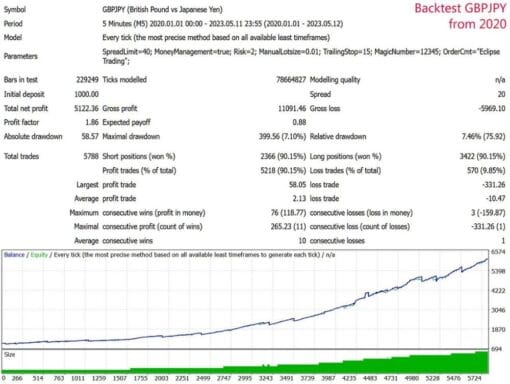
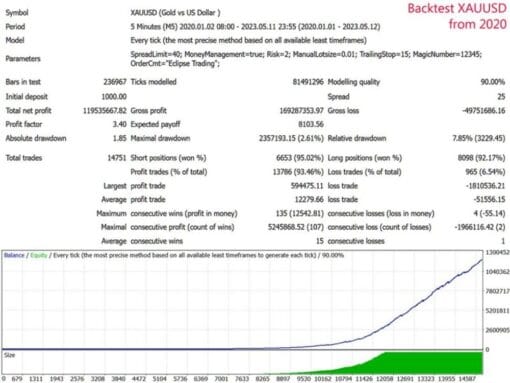
This is a third-party product supplied as an unlocked version for testing and evaluation. It may differ from the original licensed version in functionality, compatibility, updates and support. Images and performance reports come from the original developer and are not independently verified. No EA guarantees profits — test on a demo account for at least 72 hours. Read the full pre-purchase guide
ECLIPSE TRADING EA MT4 V4.0 BUILD 1444+ — V4.0
ECLIPSE TRADING EA MT4 V4.0 BUILD 1444+ is a MetaTrader trading tool supplied as an unlocked version for testing and evaluation — instant download and recommended setfiles included. Test it on demo, verify it on your broker, then decide with real data.
What It Is
A trading tool for MetaTrader, supplied as unlocked files for testing and evaluation, ready to run in minutes.
Who It's For
Traders who want hands-free execution and are willing to validate the tool on a demo account before scaling into live risk — the professional way to adopt any EA.
What's Included
The product file, recommended setfiles, a step-by-step installation guide and access to live support for setup questions.
Guarantee
Instant download right after purchase and a refund policy for defective or nonfunctional products — test everything on demo first.
About ECLIPSE TRADING EA MT4 V4.0 BUILD 1444+
ECLIPSE Trading EA MT4 V4.0 Build 1444+ – The Next Generation of Automated Forex Trading
Ready to take your MetaTrader 4 (MT4) trading to the next level? The ECLIPSE Trading EA is a sophisticated, fully automated Expert Advisor designed to help traders exploit market opportunities around the clock. With the latest Build 1444+ update, this system offers enhanced stability, improved trade logic, and a cleaner interface for both beginner and advanced users.
What is an EA?
In the world of MetaTrader, “EA” stands for Expert Advisor. An EA is a piece of software that automatically executes trades on your behalf based on pre‑defined rules. By removing human emotion from the trading process, EAs can maintain discipline, execute orders at optimal times, and manage positions 24/7.
Key Features of ECLIPSE Trading EA
- Multi‑Currency Compatibility – Trade major, minor, and exotic pairs from a single platform.
- Dynamic Position Sizing – Adjusts lot sizes based on account balance and user‑defined risk parameters.
- Advanced Trend Detection – Uses multiple moving averages and oscillator signals to identify high‑probability entry points.
- Built‑In Risk Management – Automatic stop‑loss and take‑profit placement, trailing stops, and daily loss limits to protect capital.
- Customizable Alerts – Receive email or SMS notifications for critical trade events.
- Fast Execution Engine – Optimized for low latency, ensuring timely order placement even on high‑volatility markets.
- Regular Updates – Monthly patches add new features, improve performance, and fix bugs.
How It Works
ECLIPSE Trading EA analyzes market data in real time, applying its proprietary trading algorithm to detect optimal entry and exit points. Once a trade signal is generated, the EA places the order, sets the appropriate stop‑loss and take‑profit levels, and monitors the position until it closes or is manually adjusted.
Risk Management & Safety
Trading always involves risk. ECLIPSE Trading EA incorporates several safety mechanisms to help preserve your capital:
- Maximum trade size based on a percentage of account equity.
- Daily loss limit to halt trading after a predefined drawdown.
- Stop‑loss and take‑profit enforcement with automatic adjustment to market conditions.
System Requirements
- MetaTrader 4 (MT4) platform – Windows or Mac with Windows compatibility via virtual machine.
- Minimum 2 GB RAM (recommended 4 GB).
- Internet connection for real‑time data feeds.
Installation Guide
- Download the latest
Eclipse_Trading_EA_v4.0_build1444+.zipfile from the Forex EA Store. - Extract the contents to the
Expertsfolder inside your MT4 data directory. - Open MT4, go to
Tools → Options → Expert Advisors, and enable Allow automated trading. - Drag and drop the EA onto your chart, configure risk parameters, and click OK.
- Watch the
Expertstab for real‑time trade activity.
Customer Support & Updates
The ECLIPSE Trading EA team provides:
- 24/7 email and live chat support.
- Monthly technical updates delivered automatically.
- Comprehensive user guide and video tutorials.
What Our Users Say
“ECLIPSE has streamlined my trading. I can set it and let it run while I focus on other projects.” – Alex M.
“The risk controls are top‑notch. I feel confident even during volatile swings.” – Linda R.
Important Disclaimer
This EA is provided for educational and informational purposes only. Past performance does not guarantee future results. Always test any automated trading system on a demo account before using real funds. Trading involves risk and may result in loss of capital.
Get Started Today
Unlock the potential of automated trading with the ECLIPSE Trading EA. Visit the fxshop24 to purchase and download the latest version.
Technical Specifications
| Platform | MetaTrader |
| Categories | Expert Advisor |
| Setfiles | Included |
| Version | V4.0 |
| Delivery | Instant download after checkout |
| Refund Policy | 7 days |
Frequently Asked Questions
Is this an original licensed product?
No — we supply unlocked versions for testing and evaluation, which may differ from the original licensed versions in functionality, compatibility, updates and support. For official licensing and developer support, purchase from the original developer. Read our pre-purchase guide for full details.
How and when do I receive it?
Immediately after checkout: the download link becomes available and you also receive a confirmation email. If anything is missing, contact live support and we will sort it out quickly.
Are setfiles and instructions included?
Yes — the product ships with recommended setfiles and a step-by-step installation guide, so you can go from download to a running terminal in minutes.
What if it does not work with my broker?
Reach out to support before going live: we will help you verify symbol names, account type and settings. And if the product still does not fit your setup, you are covered by our 7-day refund policy.
Ready to automate your trading?
Instant download · Setfiles included · Live support · 7-day refund policy



What others are saying
There are no contributions yet.