




HECTOR EA MT5 V2.1 + SETFILES BUILD 6266+
$19.00
Hector EA is a specialized Gold Expert Advisor (EA) built for traders who prefer disciplined automation over aggressive martingale strategies. Featuring adaptive anti-martingale logic, intelligent volatility filters, optional protective stop-loss settings, and automated risk controls, Hector EA prioritizes capital protection, disciplined trade execution, and sustainable long-term performance.
Original Product
Setfiles*
- Description
- Additional information
- Reviews (0)
Description
This is a third-party product supplied as an unlocked version for testing and evaluation. It may differ from the original licensed version in functionality, compatibility, updates and support. Images and performance reports come from the original developer and are not independently verified. No EA guarantees profits — test on a demo account for at least 72 hours. Read the full pre-purchase guide
HECTOR EA MT5 V2.1 + SETFILES BUILD 6266+ — V2.1
HECTOR EA MT5 V2.1 + SETFILES BUILD 6266+ is a MetaTrader 5 trading tool supplied as an unlocked version for testing and evaluation — instant download and recommended setfiles included. Test it on demo, verify it on your broker, then decide with real data.
What It Is
A trading tool for MetaTrader 5, supplied as unlocked files for testing and evaluation, ready to run in minutes.
Who It's For
Traders who want hands-free execution and are willing to validate the tool on a demo account before scaling into live risk — the professional way to adopt any EA.
What's Included
The product file, recommended setfiles, a step-by-step installation guide and access to live support for setup questions.
Guarantee
Instant download right after purchase and a refund policy for defective or nonfunctional products — test everything on demo first.
About HECTOR EA MT5 V2.1 + SETFILES BUILD 6266+
INTRODUCING HECTOR EA
Hector EA is a specialized Gold Expert Advisor (EA) built for traders who prefer disciplined automation over aggressive martingale strategies. Featuring adaptive anti-martingale logic, intelligent volatility filters, optional protective stop-loss settings, and automated risk controls, Hector EA prioritizes capital protection, disciplined trade execution, and sustainable long-term performance.
Vendor website: https://www.mql5.com/en/market/product/184138
Key Takeaways
- Each year is tested independently, with no compounding and the deposit reset at the start of each test. Annual results are independent of profits from previous years.
- Strategies are selected using one data period and validated on a separate out-of-sample (OOS) period excluded from the selection process.
- A stop-loss is mandatory and cannot be disabled. It is configurable from 3% to 30% of the account balance and applies independently to each strategy. Each open basket has its own separate stop-loss.
HECTOR EA Features
- Platform: MetaTrader 5 (MT5)
- Instrument: Gold (XAUUSD, 2 decimal places)
- Timeframe: Any
- Account: Hedging, ECN/RAW, zero or low spread
- Recommended Brokers: Ultima Markets (top choice), FxPro, Fusion, IC Markets, FPTrading, VT, and others
- Leverage: 1:500 or higher
- Minimum Deposit: $1,000
- VPS: Recommended for stable, uninterrupted operation
How Hector EA manages risk
Risk management is the core of Hector EA’s design, not an optional add-on. The advisor uses adaptive anti-martingale logic instead of classic averaging: exposure is only increased while every open basket remains protected by its own mandatory stop-loss. Each strategy carries an independent stop-loss, and each open basket has a separate one on top of it, so a single bad sequence can never silently escalate into a full-account drawdown.
- Mandatory stop-loss — it cannot be disabled. You configure it between 3% and 30% of the account balance, and it applies independently to each strategy.
- Volatility filter — intelligent filters keep the EA out of unstable market conditions instead of trading through them.
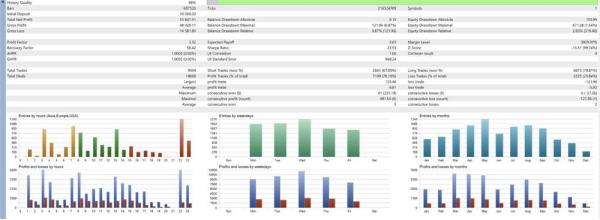
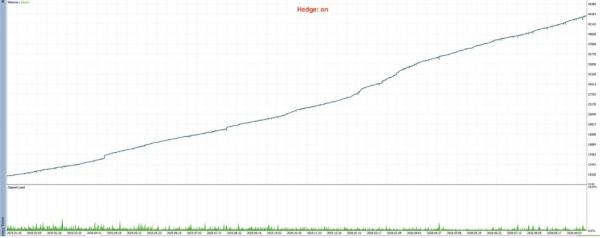
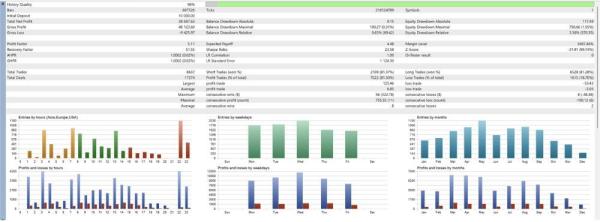
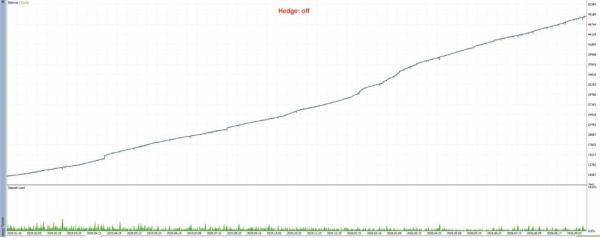
- Honest backtests — each year is tested independently with no compounding and the deposit reset at the start of each test, so annual results are not inflated by profits from previous years.
- Out-of-sample validation — strategies are selected on one data period and validated on a separate OOS period that was excluded from the selection process.
Installation & setup checklist
- Open a MetaTrader 5 hedging account with an ECN/RAW broker with zero or low spread (recommended brokers: Ultima Markets, FxPro, Fusion, IC Markets, FPTrading, VT, and others).
- Use leverage of 1:500 or higher and fund the account with at least the $1,000 minimum deposit.
- Attach Hector EA to any XAUUSD chart (2 decimal places) — the timeframe does not affect its entries.
- Run it on a VPS so the EA stays connected around the clock without interruptions.
- Load one of the included setfiles (build 6266+) and set the stop-loss within the 3%–30% range to match your personal risk tolerance.
Frequently asked questions
What instrument does Hector EA trade?
Gold only (XAUUSD, 2 decimal places) on MetaTrader 5. It is a specialized Gold Expert Advisor, not a multi-pair robot.
Can the stop-loss be disabled?
No. The stop-loss is mandatory and applies independently to each strategy and each open basket. It can only be configured between 3% and 30% of the account balance.
Does Hector EA use martingale?
No. Unlike the martingale-style systems that average into losing positions, Hector EA uses adaptive anti-martingale logic that prioritizes capital protection over aggressive position building.
What is the minimum deposit?
$1,000, with leverage of 1:500 or higher on a hedging account. This is the vendor’s recommendation, not financial advice — only trade with capital you can afford to lose.
Does it need a VPS?
A VPS is strongly recommended: an EA that is disconnected when the market moves cannot manage its baskets. A stable VPS keeps Hector EA running continuously.
Where can I see the original vendor page?
The official MQL5 market listing is available here: mql5.com/en/market/product/184138.
Related guides
- Beginner guide to MT4/MT5 automation that actually works
- The small-account trader’s guide to money management with Expert Advisors
- Examples of automated trading strategies for MT4 and MT5
Technical Specifications
| Platform | MetaTrader 5 |
| Categories | Expert Advisors MT5 |
| Setfiles | Included |
| Version | V2.1 |
| Delivery | Instant download after checkout |
| Refund Policy | 7 days |
Frequently Asked Questions
Is this an original licensed product?
No — we supply unlocked versions for testing and evaluation, which may differ from the original licensed versions in functionality, compatibility, updates and support. For official licensing and developer support, purchase from the original developer. Read our pre-purchase guide for full details.
How and when do I receive it?
Immediately after checkout: the download link becomes available and you also receive a confirmation email. If anything is missing, contact live support and we will sort it out quickly.
Are setfiles and instructions included?
Yes — the product ships with recommended setfiles and a step-by-step installation guide, so you can go from download to a running terminal in minutes.
What if it does not work with my broker?
Reach out to support before going live: we will help you verify symbol names, account type and settings. And if the product still does not fit your setup, you are covered by our 7-day refund policy.
Ready to automate your trading?
Instant download · Setfiles included · Live support · 7-day refund policy
Additional information
| pa_info | EA, NoDLL |
|---|---|
| pa_manual | No |
| pa_pair | XAUUSD |
| pa_platform | Metatrader 5 |
| pa_preset | Yes |
| pa_timeframe | H1 |







Reviews
There are no reviews yet.