






News Catcher Pro EA v4.38 MT4
$19.00
Discover the News Catcher Pro EA, an advanced automated trading tool for MetaTrader 4, focusing on strategies around market news events.
Original Product
Setfiles*
- Description
- Discussion (0)
Description
This is a third-party product supplied as an unlocked version for testing and evaluation. It may differ from the original licensed version in functionality, compatibility, updates and support. Images and performance reports come from the original developer and are not independently verified. No EA guarantees profits — test on a demo account for at least 72 hours. Read the full pre-purchase guide
News Catcher Pro EA v4.38 MT4 — V4.38
News Catcher Pro EA v4.38 MT4 is a MetaTrader 4 trading tool supplied as an unlocked version for testing and evaluation — instant download and recommended setfiles included. Test it on demo, verify it on your broker, then decide with real data.
What It Is
A scalping trading tool for MetaTrader 4, supplied as unlocked files for testing and evaluation, ready to run in minutes.
Who It's For
Traders with a low-spread broker and a VPS who want frequent, short-lived trades and who verify execution quality on demo before scaling up.
What's Included
The product file, recommended setfiles, a step-by-step installation guide and access to live support for setup questions.
Guarantee
Instant download right after purchase and a refund policy for defective or nonfunctional products — test everything on demo first.
About News Catcher Pro EA v4.38 MT4
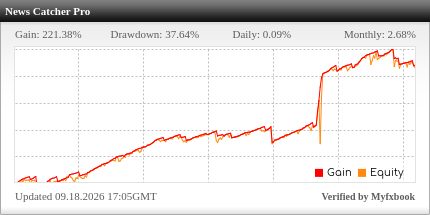
News Catcher Pro EA v4.38 is one of the few Expert Advisors built specifically for news trading: instead of avoiding high-impact economic releases like most robots, it was engineered to trade the volatility they create. It comes from the same developer family behind Waka Waka and Perceptrader AI, with live results published on a verified Myfxbook account.
In this review
- What is News Catcher Pro?
- How the strategy works
- News trading: what you must understand first
- Key features
- What is included
- Recommended setup
- Who it is for (and who it is not for)
- Installation in 4 steps
- Frequently asked questions
- Risk warning
What is News Catcher Pro?
News Catcher Pro is an MT4 Expert Advisor tuned for GBPUSD, EURUSD and EURGBP on the M5 timeframe. Despite the name, its actual mechanics are subtler than “buy the spike”: it combines a refined mean-reversion approach with event-driven positioning, placing trades around significant news to capture the intraday fluctuations that follow. It is part of a broader collection of EAs from the same author, each built on a distinct trading tactic — and unlike most news EAs, it backs its claims with a verified Myfxbook track record.
How the strategy works
- Event monitoring — the EA tracks the economic calendar and identifies when high-impact releases are due on the traded pairs.
- Pre-announcement positioning — rather than chasing the initial spike (where spreads explode and fills are terrible), it positions just prior to announcements based on recurring volatility patterns.
- Mean-reversion harvesting — after the release, it trades the oscillations that follow as the market digests the number, on the M5 chart.
- Pair selection — GBPUSD, EURUSD and EURGBP: liquid pairs where news reactions are strong but spreads remain manageable.
News trading: what you must understand first
News trading is the most broker-sensitive category in automated trading, full stop. During high-impact releases, spreads widen, slippage grows, and execution speed decides whether a backtest profit becomes a live profit or a live loss. Two consequences for you: first, broker choice is part of the strategy — the same EA can look brilliant on one broker and broken on another during the same NFP release. Second, demo results are less predictive here than for any other EA type, because demo fills during news are unrealistically good. Budget real time for small-size live testing before scaling.
Key features
- Purpose-built for news events — trades the volatility others avoid
- Refined mean-reversion engine — harvests post-release oscillations
- M5 precision — fast timeframe for event-driven entries
- Three liquid pairs — GBPUSD, EURUSD, EURGBP
- Verified Myfxbook results — live tracking, not just backtests
- Proven developer family — same author lineage as Waka Waka and Perceptrader AI
- V4.38 latest build — continuous updates included
What is included
- News Catcher Pro EA v4.38 for MetaTrader 4
- Recommended settings for the supported pairs
- Setup documentation
- Free updates
Important: the download archive is encrypted. Open it with 7-Zip or WinRAR using the password: fxshop24.net
Recommended setup
| Pairs | GBPUSD, EURUSD, EURGBP |
| Timeframe | M5 |
| Broker | ECN with tight spreads and fast execution — decisive for news trading |
| VPS | Required in practice — low latency near your broker’s server |
| Testing | Small live sizes after demo — news fills differ between demo and real |
Who it is for (and who it is not for)
News Catcher Pro is a good fit if you understand that event trading is a specialists’ game, you have (or will get) a true ECN broker and a low-latency VPS, and you accept that results depend on execution quality. It is not for you if you want a calm equity curve, if you trade with a wide-spread market maker, or if you expect demo performance during news to replicate live — it will not, anywhere, with any news EA.
Installation in 4 steps
- Download after checkout and extract the archive with 7-Zip/WinRAR (password:
fxshop24.net). - Copy the EA into
MQL4/Expertsand restart MetaTrader 4. - Attach it to GBPUSD, EURUSD and EURGBP on M5 with the recommended settings.
- Verify the calendar feed works, run on demo through several high-impact releases, then test with small live sizes.
Full walkthrough with screenshots: How to install an Expert Advisor.
Frequently asked questions
What is the archive password? The archive is encrypted — open it with 7-Zip or WinRAR using the password fxshop24.net.
Does it trade every day? No — only around significant news events on the supported pairs. Quiet calendar days mean no trades, by design.
Which pairs does it support? GBPUSD, EURUSD and EURGBP on M5.
Are the Myfxbook results real? The vendor publishes live verified tracking — a better signal than backtests, though still no guarantee of future results, especially in a broker-sensitive category.
Can I use it with any broker? Technically yes; practically, news trading without tight spreads and fast execution is uphill. Ask support if unsure about yours.
How do I receive it? Instant download after checkout. You are covered by our 7-day refund policy.
Risk warning
Trading around news with leverage involves extreme short-term risk: spreads widen, slippage increases, and stops can fill far from their level. Demo performance during news events is typically better than live results. Always test with small sizes first, never trade capital you cannot afford to lose, and remember that past performance does not guarantee future results.
Technical Specifications
| Platform | MetaTrader 4 |
| Categories | Scalping EAs, Expert Advisors MT4 |
| Strategy | Scalping |
| Setfiles | Included |
| Version | V4.38 |
| Delivery | Instant download after checkout |
| Refund Policy | 7 days |
Frequently Asked Questions
Is this an original licensed product?
No — we supply unlocked versions for testing and evaluation, which may differ from the original licensed versions in functionality, compatibility, updates and support. For official licensing and developer support, purchase from the original developer. Read our pre-purchase guide for full details.
How and when do I receive it?
Immediately after checkout: the download link becomes available and you also receive a confirmation email. If anything is missing, contact live support and we will sort it out quickly.
Are setfiles and instructions included?
Yes — the product ships with recommended setfiles and a step-by-step installation guide, so you can go from download to a running terminal in minutes.
What if it does not work with my broker?
Reach out to support before going live: we will help you verify symbol names, account type and settings. And if the product still does not fit your setup, you are covered by our 7-day refund policy.
Ready to automate your trading?
Instant download · Setfiles included · Live support · 7-day refund policy


What others are saying
There are no contributions yet.