





MOSQUITO MT5 V1.3 + SETFILES BUILD 5984+
$14.99
- Automated Expert Advisor for XAUUSD (Gold) trading on MetaTrader 5.
- Utilizes hedging logic for structured trading strategies.
- Designed for traders who prefer clear setup guidelines and information.
- Ideal for use on the H1 (60-minute) timeframe with stable broker execution.
- Package includes setfiles for easier configuration and testing.
- Recommended to test on demo accounts before live trading.
- Encourages adjustments based on individual trading conditions like drawdown and account risk.
Original Product
Setfiles*
- Description
- Reviews (0)
Description
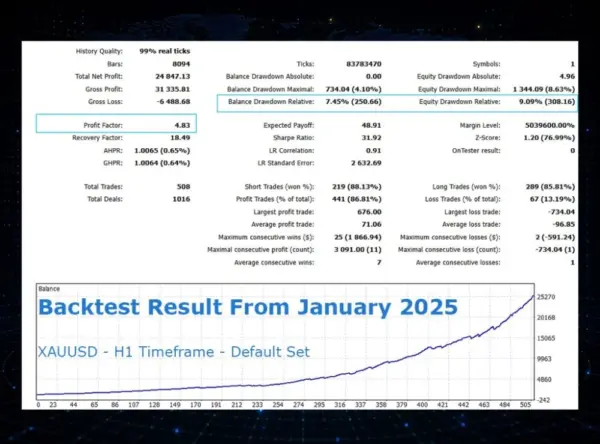
This is a third-party product supplied as an unlocked version for testing and evaluation. It may differ from the original licensed version in functionality, compatibility, updates and support. Images and performance reports come from the original developer and are not independently verified. No EA guarantees profits — test on a demo account for at least 72 hours. Read the full pre-purchase guide
MOSQUITO MT5 V1.3 + SETFILES BUILD 5984+ — V1.3
MOSQUITO MT5 V1.3 + SETFILES BUILD 5984+ is a MetaTrader 5 trading tool supplied as an unlocked version for testing and evaluation — instant download and recommended setfiles included. Test it on demo, verify it on your broker, then decide with real data.
What It Is
A trading tool for MetaTrader 5 focused on Gold (XAUUSD), supplied as unlocked files for testing and evaluation, ready to run in minutes.
Who It's For
Traders who want hands-free execution and are willing to validate the tool on a demo account before scaling into live risk — the professional way to adopt any EA.
What's Included
The product file, recommended setfiles, a step-by-step installation guide and access to live support for setup questions.
Guarantee
Instant download right after purchase and a refund policy for defective or nonfunctional products — test everything on demo first.
About MOSQUITO MT5 V1.3 + SETFILES BUILD 5984+
Mosquito MT5 v1.3 is a lightweight, fast-execution Expert Advisor for MetaTrader 5, updated to run on terminal build 5984 and above. Its calling card is the inclusion of ready-made setfiles: instead of guessing parameters from scratch, you load configurations that have already been tested. This review covers what the EA does, how its high-frequency logic behaves in real conditions, and what you need in place before going live.
In this review
- What is Mosquito MT5?
- How the strategy works
- Live performance tracking
- Key features
- What is included
- Recommended setup
- Who it is for (and who it is not for)
- Installation in 4 steps
- What verified buyers say
- FAQ
- Risk warning
What is Mosquito MT5?
Mosquito is a compact scalping robot for MetaTrader 5 that focuses on quick, frequent trades with tight management. Version 1.3 targets the latest MT5 terminal builds (5984+), which is relevant because MetaQuotes updates occasionally break older compiled EAs — a package built for current builds saves you from compatibility surprises.
The product is deliberately minimal: small footprint, low CPU usage, and a set of predefined configurations. That makes it a candidate for traders who run several EAs on the same VPS, or who simply want a plug-and-play starting point rather than weeks of parameter optimization.
How the strategy works
The logic follows the classic high-frequency scalping school: small profit targets, disciplined exits, and strict filtering of trading conditions. Two design choices stand out:
- Session filters — the EA favors liquid market hours and deliberately avoids rollover and major news windows, when spreads widen and scalping edge evaporates.
- Tight trade management — positions are opened with small targets and closed quickly, limiting the time each trade is exposed to the market.
The practical implication is that Mosquito is broker-sensitive. High-frequency styles are the most exposed to spread, slippage and execution latency of any EA category. The same setfile can perform well on one broker and poorly on another — demo testing on your own account is not optional here, it is part of the setup.
Live performance tracking
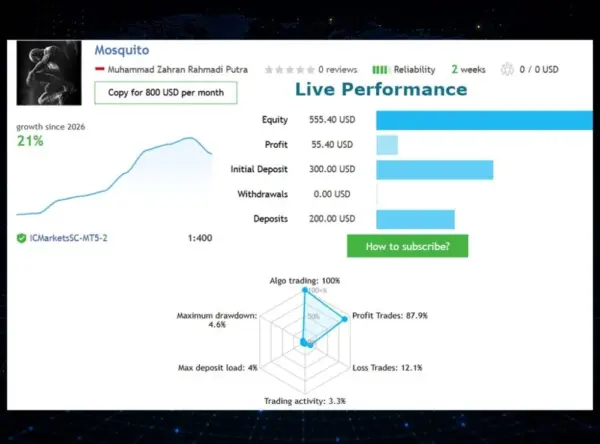
The product is distributed with tested setfiles, but no public third-party verified track record (Myfxbook, FX Blue) is linked in the sales material, so we treat performance as unverified. The honest way to evaluate this kind of EA is a 3–4 week demo forward test on your own broker: log the average spread during traded hours, count slippage on exits, and compare results against the setfile’s expectations. Past performance does not guarantee future results.
Key features
- Built for MT5 build 5984+ — compatible with the current MetaTrader 5 terminal generation
- Ready-made setfiles included — start from tested configurations instead of blank inputs
- High-frequency scalping logic — quick trades with small targets and disciplined exits
- Session and news filters — avoids rollover and high-spread windows automatically
- Low CPU footprint — runs smoothly alongside other EAs on modest VPS plans
- Low entry barrier — works from a $200 minimum deposit
What is included
- Mosquito EA v1.3 for MetaTrader 5 (build 5984 and above)
- Ready-to-load setfiles with tested configurations
- Installation and configuration guide
- Instant download after purchase
- Free help via our customer support if you need it
Recommended setup
| Setting | Recommendation |
|---|---|
| Pairs | As specified in the included setfiles |
| Timeframe | Low timeframes (M1 – M15) |
| Minimum deposit | $200 |
| Account type | Low-spread / ECN account strongly preferred |
| Broker | Raw-spread MT5 broker with fast execution |
| VPS | Strongly advised, with low latency to your broker |
Who it is for (and who it is not for)
It is for MT5 traders who want a lightweight scalper they can configure quickly via setfiles, multi-EA users who need a low-resource robot on a shared VPS, and cost-conscious traders (the $200 minimum deposit is unusually accessible).
It is not for traders on wide-spread standard accounts (the strategy’s economics break down), anyone unable to run a VPS, or investors who demand a publicly verified live track record before purchase.
Installation in 4 steps
- Download the package from your account after purchase and unzip it.
- Copy the EA into the MQL5/Experts folder of your MetaTrader 5 terminal and restart it.
- Attach the EA to the chart specified by the setfile, load the .set file from the Inputs tab, and enable algo trading.
- Forward-test on demo for at least 3–4 weeks, monitoring spread and slippage, before considering a live account.
Step-by-step instructions: How to install an Expert Advisor.
What verified buyers say
No customer reviews have been published for Mosquito MT5 on our site yet. Your honest feedback after purchase — positive or negative — helps other traders and keeps the catalog transparent.
FAQ
Is it compatible with the newest MT5 builds? Yes — this package is built for terminal build 5984 and above.
Are the setfiles mandatory? No, but they are the recommended starting point. You can adjust inputs after you have demo data to work from.
Which pairs does it trade? Follow the included setfiles — each configuration specifies its intended symbol and timeframe.
How is it delivered? Instant digital download after payment, with no manual activation wait.
Can I get a refund? Defective or non-working products are covered by our 7-day refund policy, issued as store credit — see the refund policy.
Risk warning
High-frequency trading with leverage carries substantial risk and can result in the loss of your deposit. Scalping systems are extremely sensitive to spread, slippage and latency; live results depend heavily on your broker and VPS. No independent track record was available for this product at the time of writing, and past performance does not guarantee future results. Always test on demo first, trade only with money you can afford to lose, and consider independent financial advice. Nothing on this page constitutes investment advice.
More Best Gold EAs (XAUUSD) worth checking
- Stable Gold EA v1.1 MT5
- ALGOWIN EA MT5
- The Gold Reaper MT5 v4.6 — Source Code
- Golden Conqueror MT5 v1.3
Browse the full category: Best Gold EAs (XAUUSD)
Archive password: fxshop24.net (the archive is encrypted — open it with 7-Zip or WinRAR).
Technical Specifications
| Platform | MetaTrader 5 |
| Categories | Best Gold EAs (XAUUSD), Expert Advisor, Expert Advisors MT5 |
| Primary Market | Gold (XAUUSD) |
| Setfiles | Included |
| Version | V1.3 |
| Delivery | Instant download after checkout |
| Refund Policy | 7 days |
Frequently Asked Questions
Is this an original licensed product?
No — we supply unlocked versions for testing and evaluation, which may differ from the original licensed versions in functionality, compatibility, updates and support. For official licensing and developer support, purchase from the original developer. Read our pre-purchase guide for full details.
How and when do I receive it?
Immediately after checkout: the download link becomes available and you also receive a confirmation email. If anything is missing, contact live support and we will sort it out quickly.
Are setfiles and instructions included?
Yes — the product ships with recommended setfiles and a step-by-step installation guide, so you can go from download to a running terminal in minutes.
What if it does not work with my broker?
Reach out to support before going live: we will help you verify symbol names, account type and settings. And if the product still does not fit your setup, you are covered by our 7-day refund policy.
Ready to automate your trading?
Instant download · Setfiles included · Live support · 7-day refund policy





Reviews
There are no reviews yet.