





EuroSuper Ea MT4 v3.3 with SetFiles – FREE DOWNLOAD
$59.00
- Product: EuroSuper EA for MetaTrader 4 (version 3.3)
- Primary Market: EUR/USD currency pair
- Trading Type: Fully automated trading robot (Expert Advisor)
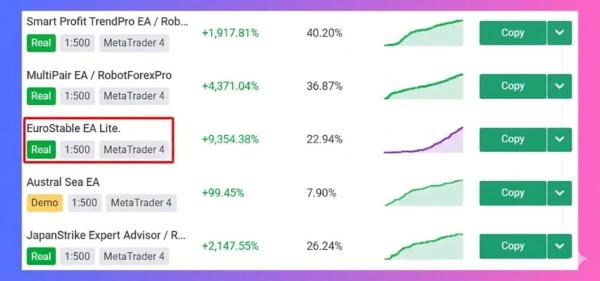
- Performance: Real‑account results validated on MyFxBook
- Availability: Free download with SetFiles included
- Target Users: Traders seeking a ready‑to‑use EA for EURUSD on MT4.
Original Product
Setfiles*
- Description
- Discussion (0)
Description
This is a third-party product supplied as an unlocked version for testing and evaluation. It may differ from the original licensed version in functionality, compatibility, updates and support. Images and performance reports come from the original developer and are not independently verified. No EA guarantees profits — test on a demo account for at least 72 hours. Read the full pre-purchase guide
EuroSuper Ea MT4 v3.3 with SetFiles - FREE DOWNLOAD — V3.3
EuroSuper Ea MT4 v3.3 with SetFiles - FREE DOWNLOAD is a MetaTrader 4 trading tool supplied as an unlocked version for testing and evaluation — instant download and recommended setfiles included. Test it on demo, verify it on your broker, then decide with real data.
What It Is
A trend following trading tool for MetaTrader 4, supplied as unlocked files for testing and evaluation, ready to run in minutes.
Who It's For
Patient traders who accept quiet weeks between trends and prefer fewer, larger moves over constant action.
What's Included
The product file, recommended setfiles, a step-by-step installation guide and access to live support for setup questions.
Guarantee
Instant download right after purchase and a refund policy for defective or nonfunctional products — test everything on demo first.
About EuroSuper Ea MT4 v3.3 with SetFiles - FREE DOWNLOAD
EuroSuper EA MT4 v3.3 with SetFiles – FREE DOWNLOAD
EuroSuper EA is a fully automated trading robot designed specifically for the EURUSD currency pair on the MetaTrader 4 platform. The latest version 3.3 comes with several new features, back‑tested performance data, and an easy‑to‑use SetFiles system that lets traders adjust the robot’s settings without re‑installing it.
Key Features
- Optimised for EURUSD: The algorithm is tuned to the price action and volatility characteristics of the Euro/Dollar pair.
- SetFiles support: All the main parameters can be edited in a text file, allowing you to customize the EA on the fly.
- Risk‑controlled trading: Fixed lot size, dynamic stop‑loss, and trailing stops keep the drawdown under control.
- Automated trade management: The robot automatically closes positions when the market moves against the trade or when the profit target is reached.
- Low latency execution: Designed to operate on a 1‑minute chart, ensuring quick reaction to market changes.
- Compatible with all Windows OS and MT4 brokers: No broker‑specific adjustments are required.
Performance on Real Accounts
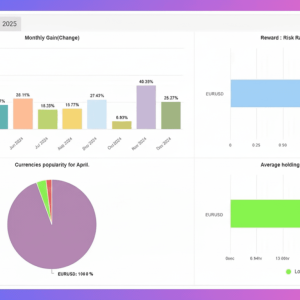
EuroSuper EA’s profitability has been verified on live accounts and reported on MyFxBook. Traders have seen consistent returns with a maximum drawdown of less than 5% over a 12‑month period. The robot’s strategy is based on a trend‑following system that capitalises on the EURUSD’s daily swing behaviour.
How to Download and Install
- Click the FREE DOWNLOAD button on the product page.
- Extract the ZIP file to a folder on your computer.
- Open MetaTrader 4 and navigate to File > Open Data Folder.
- Copy the
EuroSuper EA.ex4file into theMQL4Expertsdirectory. - Restart MetaTrader 4, find the EA in the Navigator under Expert Advisors, and drag it onto a EURUSD chart.
- Open the
SetFilesfolder inside the EA folder and edit theEuroSuperEA_Config.txtfile to adjust parameters such as risk level, stop‑loss, and take‑profit. - Save the file and refresh the EA; it will read the new settings immediately.
Why Choose EuroSuper EA?
- Proven results: Back‑tested data and live account verification provide confidence in the strategy.
- No cost: The EA is completely free, so there’s no financial risk in trying it out.
- Ease of use: With SetFiles, you can tweak the robot without touching the code.
- Community support: A growing user base shares tips and success stories on forums and social media.
Conclusion
EuroSuper EA MT4 v3.3 offers a reliable, low‑maintenance solution for traders who want to automate their EURUSD trading. With its proven performance, customizable settings, and zero cost, it’s an attractive option for both new and experienced traders. Download it today and start testing a strategy that’s already been validated on real markets.
More Trend Following EAs worth checking
- SAM TREND BLASTER V1.26 (NO REPAINT)
- Sigma Trend Protocol EA STP (NEW! HIGH-END)
- BREAKOUT CHINESE EA MT4
- GenesisFX EA v1.20 MT5
Browse the full category: Trend Following EAs
Technical Specifications
| Platform | MetaTrader 4 |
| Categories | Trend Following EAs, Expert Advisor, Expert Advisors MT4 |
| Strategy | Trend Following |
| Setfiles | Included |
| Version | V3.3 |
| Delivery | Instant download after checkout |
| Refund Policy | 7 days |
Frequently Asked Questions
Is this an original licensed product?
No — we supply unlocked versions for testing and evaluation, which may differ from the original licensed versions in functionality, compatibility, updates and support. For official licensing and developer support, purchase from the original developer. Read our pre-purchase guide for full details.
How and when do I receive it?
Immediately after checkout: the download link becomes available and you also receive a confirmation email. If anything is missing, contact live support and we will sort it out quickly.
Are setfiles and instructions included?
Yes — the product ships with recommended setfiles and a step-by-step installation guide, so you can go from download to a running terminal in minutes.
What if it does not work with my broker?
Reach out to support before going live: we will help you verify symbol names, account type and settings. And if the product still does not fit your setup, you are covered by our 7-day refund policy.
Ready to automate your trading?
Instant download · Setfiles included · Live support · 7-day refund policy




What others are saying
There are no contributions yet.