








Apex Trader MT4 v1.6 Without DLL Setfiles
$15.00
Original Product
Setfiles*
- Description
- Discussion (0)
Description
This is a third-party product supplied as an unlocked version for testing and evaluation. It may differ from the original licensed version in functionality, compatibility, updates and support. Images and performance reports come from the original developer and are not independently verified. No EA guarantees profits — test on a demo account for at least 72 hours. Read the full pre-purchase guide
Apex Trader MT4 v1.6 Without DLL Setfiles — V1.6
Apex Trader MT4 v1.6 Without DLL Setfiles is a MetaTrader 4 trading tool supplied as an unlocked version for testing and evaluation — instant download and recommended setfiles included. Test it on demo, verify it on your broker, then decide with real data.
What It Is
A trading tool for MetaTrader 4 focused on Gold (XAUUSD), supplied as unlocked files for testing and evaluation, ready to run in minutes.
Who It's For
Traders who want hands-free execution and are willing to validate the tool on a demo account before scaling into live risk — the professional way to adopt any EA.
What's Included
The product file, recommended setfiles, a step-by-step installation guide and access to live support for setup questions.
Guarantee
Instant download right after purchase and a refund policy for defective or nonfunctional products — test everything on demo first.
About Apex Trader MT4 v1.6 Without DLL Setfiles
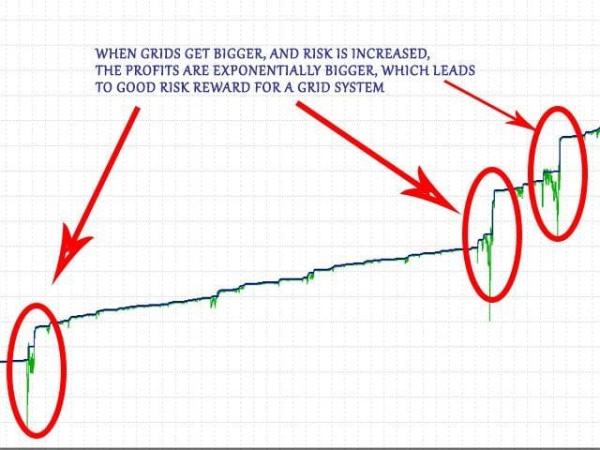
Apex Trader MT4 is a versatile Expert Advisor that employs a range of strategies, including mean-reversion and trend-following, to ensure adaptability to varying market conditions. Specializing in the AUDCAD, AUDNZD, and NZDCAD currency pairs, Apex Trader operates seamlessly on the MetaTrader 4 platform. At its core, the EA utilizes a dynamic grid system with variable take-profit levels. This smart grid approach enables Apex Trader to open multiple positions, maximizing the potential for profit as trends unfold. Additionally, the take-profit levels are intelligently managed, adjusting automatically based on real-time market conditions to optimize performance and enhance trading efficiency.
Key Takeaways
Apex Trader MT4 is a versatile Expert Advisor that uses multiple strategies, including mean reversion and trend following, to ensure adaptability to different market conditions.
The EA specializes in AUDCAD, AUDNZD, and NZDCAD currency pairs, running smoothly on the MetaTrader 4 platform and using a dynamic grid system with variable take profit levels.
The intelligent grid method allows the Apex Trader to open multiple positions, maximizing profit potential as trends unfold, with smartly managed take profit levels adjusted in real time based on market conditions to enhance trading efficiency.
About The Author
This Expert Advisor is developed by Wim Schrynemakers, who brings over 11+ years of experience in MQL5 to the table. He has worked on several notable products, including Indicement MT4, Gold Trade Pro MT4, The Gold Reaper MT4, Daytrade Pro Algo MT4,…and the highly successful Apex Trader MT4, which stands out as his top-performing creation.
Apex Trader MT4 Features
Used on platform: Meta Trader 4.
Curency pairs: AUDCAD, AUDNZD or NZDCAD.
Time frame: M15.
Minimum deposit: 300$.
For live trading, it is recommended to use the OneChartSetup, and run simply 1 EURUSD M15 chart to execute all optimized pairs automatically from 1 chart.
EA utilizing a smart grid system with variable take-profit levels.
Expert Advisor trading automated 100%.
Recommend use VPS Click see here.
How to install and run the Apex Trader MT4 Trading Bot in Metatrader 4?
Open the Metatrader 4 platform
From the top menu, click on “File”
Now click on “Open Data Folder”
Open the “MQL4” folder
Open the “Experts” folder
Copy the Apex Trader v1.6.ex4 file here
Then close and restart the MT4 platform
Attach the Expert Advisor to the chart
What’s in the package?
Experts:
Apex Trader MT4.ex4
Indicators
Apex Trader MT4.ex4
Presets
StartLots 0.01.set
StartLots 0.02.set
StartLots 0.05.set
StartLots 0.1.set
StartLots 0.5.set
Guide:
Apex Trader_Manual
Important information!
For the first 2 weeks, trade on a demo account or a cent account to choose the best trading conditions for yourself
Install a trading advisor on a VPS
Real Account Profit Recorded every Friday end of the trading week
****Please note:
All Trading involves risk. Leveraged trading has large potential rewards, but also large potential risk. Be aware and accept this risk before trading. Never trade with money you cannot afford to lose. All forecasting is based on statistics derived from past performance of any trading methodology is no guarantee of future results.
Technical Specifications
| Platform | MetaTrader 4 |
| Categories | Best Gold EAs (XAUUSD), Expert Advisor, Expert Advisors MT4 |
| Primary Market | Gold (XAUUSD) |
| Setfiles | Included |
| Version | V1.6 |
| Delivery | Instant download after checkout |
| Refund Policy | 7 days |
Frequently Asked Questions
Is this an original licensed product?
No — we supply unlocked versions for testing and evaluation, which may differ from the original licensed versions in functionality, compatibility, updates and support. For official licensing and developer support, purchase from the original developer. Read our pre-purchase guide for full details.
How and when do I receive it?
Immediately after checkout: the download link becomes available and you also receive a confirmation email. If anything is missing, contact live support and we will sort it out quickly.
Are setfiles and instructions included?
Yes — the product ships with recommended setfiles and a step-by-step installation guide, so you can go from download to a running terminal in minutes.
What if it does not work with my broker?
Reach out to support before going live: we will help you verify symbol names, account type and settings. And if the product still does not fit your setup, you are covered by our 7-day refund policy.
Ready to automate your trading?
Instant download · Setfiles included · Live support · 7-day refund policy



What others are saying
There are no contributions yet.