






N.I.Z.E.N Forex Indicator Software Mt4
$10.00
Original Product
Setfiles*
- Description
- Discussion (0)
Description
This is a third-party product supplied as an unlocked version for testing and evaluation. It may differ from the original licensed version in functionality, compatibility, updates and support. Images and performance reports come from the original developer and are not independently verified. No EA guarantees profits — test on a demo account for at least 72 hours. Read the full pre-purchase guide
N.I.Z.E.N Forex Indicator Software Mt4
N.I.Z.E.N Forex Indicator Software Mt4 is a MetaTrader 4 trading tool supplied as an unlocked version for testing and evaluation — instant download and recommended setfiles included. Test it on demo, verify it on your broker, then decide with real data.
What It Is
A trading tool for MetaTrader 4 focused on Forex majors, supplied as unlocked files for testing and evaluation, ready to run in minutes.
Who It's For
Traders who want hands-free execution and are willing to validate the tool on a demo account before scaling into live risk — the professional way to adopt any EA.
What's Included
The product file, recommended setfiles, a step-by-step installation guide and access to live support for setup questions.
Guarantee
Instant download right after purchase and a refund policy for defective or nonfunctional products — test everything on demo first.
About N.I.Z.E.N Forex Indicator Software Mt4
Nizen Master PRO Strategy – Revolutionize Your Trading With Invent AI.
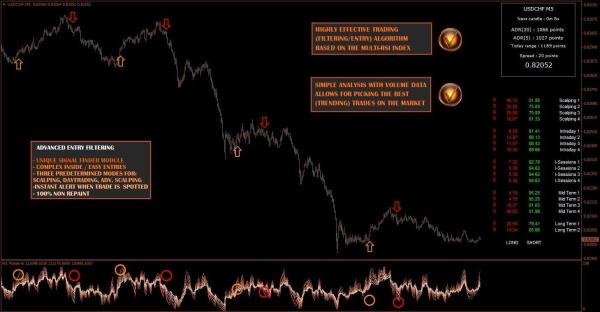
Software uses a new method of signal filtering.
Whenever an Equalizer finds a signal it’s copied to the main chart instant alert.
Key Features
Non-Repainting Signals:
Once signals are generated, they remain fixed, ensuring consistent and reliable data for your trading decisions.
Comprehensive Alerts:
Receive visual and audio alerts, along with notifications sent directly to your MT4 platform, email, or phone, so you never miss an opportunity.
Unlimited MT4 Accounts:
Easily use the Nizen Master PRO across multiple MT4 accounts with no limitations.
Market Trend Overview
The Market Data Feed window on the right side of the MetaTrader 4 screen shows mostly or all red arrows, signaling a strong downtrend across the market.
Ignore Long Entries
On the chart, take only short entry signals. Avoid long entries, as they go against the dominant trend.
Exit Strategy Tip
You can use long entry signals as potential exit points for your short positions.
Software Specifications
The Nizen indicator is compatible with any trading instrument and timeframe, making it ideal for scalpers, day traders, and swing traders alike.
You can start profiting in just minutes. Our software is designed for traders who need a versatile tool that performs well under all market conditions.
Product Download Package?
The download package of the product suite includes:
Indicators
✅ MasterContractDataFeed.ex4
✅ MasterFXE3.ex4
✅ MasterFXE2.ex4
✅ MasterFXE1.ex4
✅ MasterTXDash.ex4
Templates:
✅ MasterPRO-1.tpl
✅ MasterPRO-2.tpl
✅ MasterPRO-3.tpl
Guide:
✅ Master PRO – System Manual
****Please note:
All Trading involves risk. Leveraged trading has large potential rewards, but also large potential risk. Be aware and accept this risk before trading. Never trade with money you cannot afford to lose. All forecasting is based on statistics derived from past performance of any trading methodology is no guarantee of future results.
More Expert Advisors MT4 worth checking
- TH100 Trading System Indicator MT4
- Prime TRX – Advanced Forex Trading Dashboard with Real-Time Market Flow Analysis for MT4
- OPTI QUANT PRO – Ultra-Fast Non-Repaint MT4 Indicator
- RFI levels PRO MT4
Browse the full category: Expert Advisors MT4
Technical Specifications
| Platform | MetaTrader 4 |
| Categories | Expert Advisors MT4, Indicators |
| Primary Market | Forex majors |
| Setfiles | Included |
| Version | Latest release |
| Delivery | Instant download after checkout |
| Refund Policy | 7 days |
Frequently Asked Questions
Is this an original licensed product?
No — we supply unlocked versions for testing and evaluation, which may differ from the original licensed versions in functionality, compatibility, updates and support. For official licensing and developer support, purchase from the original developer. Read our pre-purchase guide for full details.
How and when do I receive it?
Immediately after checkout: the download link becomes available and you also receive a confirmation email. If anything is missing, contact live support and we will sort it out quickly.
Are setfiles and instructions included?
Yes — the product ships with recommended setfiles and a step-by-step installation guide, so you can go from download to a running terminal in minutes.
What if it does not work with my broker?
Reach out to support before going live: we will help you verify symbol names, account type and settings. And if the product still does not fit your setup, you are covered by our 7-day refund policy.
Ready to automate your trading?
Instant download · Setfiles included · Live support · 7-day refund policy

What others are saying
There are no contributions yet.