

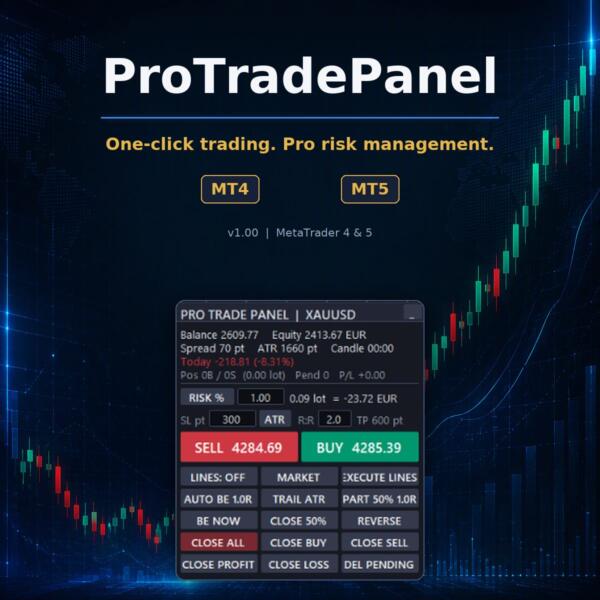
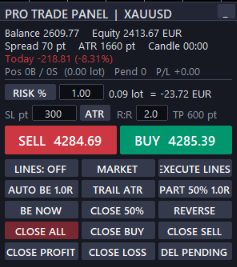

ProTradePanel MT4-MT5 — FREE
$0.00
ProTradePanel is a free tool designed to enhance trading efficiency on the MT5 platform.
Original Product
Setfiles*
- Description
- Discussion (0)
Description
This Expert Advisor was developed by the FXShop24 team. You receive full assistance, official support and updates directly from us. Read our pre-purchase testing guide before running it live.
ProTradePanel MT4-MT5 — FREE
ProTradePanel MT4-MT5 — FREE is an original MetaTrader 4 trading tool developed by the FXShop24 team, with full support and updates included — instant download and recommended setfiles included. Test it on demo, verify it on your broker, then decide with real data.
What It Is
An automated trading tool developed by the FXShop24 team for MetaTrader 4 and ready to run on your terminal in minutes.
Who It's For
Traders who want hands-free execution and are willing to validate the tool on a demo account before scaling into live risk — the professional way to adopt any EA.
What's Included
The product file, recommended setfiles, a step-by-step installation guide and access to live support for setup questions.
Guarantee
Original FXShop24 product with full support, instant download right after purchase and our refund policy.
About ProTradePanel MT4-MT5 — FREE
ProTradePanel — FREE Download (MT5)
© fxshop24.net — https://fxshop24.net
Free Expert Advisor released by the fxshop24 channel.
What it does
- The ProTradePanel is designed to enhance trading efficiency on the MT5 platform.
- It provides traders with an intuitive interface to manage trades effectively.
- Users can monitor multiple assets simultaneously using the tool.
- The panel allows for quick execution of trades with customizable parameters.
- It includes features for setting alerts and notifications for price movements.
Key features
- Intuitive Interface: Easy to navigate and user-friendly.
- Multi-Asset Monitoring: Track various assets in one place.
- Quick Trade Execution: Execute trades swiftly with a single click.
- Customizable Parameters: Tailor settings to suit individual trading strategies.
- Price Alerts: Set notifications for significant price changes.
In the package
- ProTradePanel.ex4-ex5
- ProTradePanel_User_Manual.pdf
How to install
- Download the ProTradePanel files from the provided source.
- Open the MT5 platform and navigate to the “File” menu.
- Select “Open Data Folder” and then go to the “MQL5” folder.
- Copy the ProTradePanel.ex4 file into the “Experts” folder.
- Restart the MT5 platform to load the new tool.
- Access the ProTradePanel from the “Navigator” panel under “Expert Advisors.”
Risk disclaimer
Trading leveraged products carries a high level of risk. Past performance is not indicative of future results. This software is provided “as is” — always test on a demo account first.
© fxshop24.net — https://fxshop24.net — Free distribution. Resale or removal of the copyright notice is not permitted.
Archive password: fxshop24.net (the archive is encrypted — open it with 7-Zip or WinRAR).
More FXShop24 Exclusive EAs worth checking
- BandMatrix Pro MT4 EA v2.00 | Multi‑Timeframe Bollinger Bands | Prop Firm Mode | 21 Symbols Portfolio | Dashboard Live
- FX24 SessionBreakout EA v1.10 MT5 — FREE
- Trend Follower EA GBPUSD H1 – MT4 Expert Advisor for Breakout Strategy with Optimized SetFiles
- Fort Knox EA v2.0 MT4 & MT5 – XAUUSD H1 (3 Live Accounts)
- Zerqon EA MT5
- EA Eliott+fibo MT4
Browse the full category: FXShop24 Exclusive EAs
Technical Specifications
| Platform | MetaTrader 4 |
| Categories | Free EA, MT4, MT5, Expert Advisors MT4, Expert Advisors MT5, FXShop24 Exclusive EAs, Utilities |
| Setfiles | Included |
| Version | Latest release |
| Delivery | Instant download after checkout |
| Refund Policy | 7 days |
Frequently Asked Questions
Is this an official FXShop24 product?
Yes — this Expert Advisor was developed by the FXShop24 team. You receive full assistance, official support and updates directly from us.
How and when do I receive it?
Immediately after checkout: the download link becomes available and you also receive a confirmation email. If anything is missing, contact live support and we will sort it out quickly.
Are setfiles and instructions included?
Yes — the product ships with recommended setfiles and a step-by-step installation guide, so you can go from download to a running terminal in minutes.
What if it does not work with my broker?
Reach out to support before going live: we will help you verify symbol names, account type and settings. And if the product still does not fit your setup, you are covered by our 7-day refund policy.
Ready to automate your trading?
Instant download · Setfiles included · Live support · 7-day refund policy


What others are saying
There are no contributions yet.