




BB AO EMA V2.6 MT5 NO DLL
$29.99
- Triple‑Filter Engine – Combines Bollinger Bands, Awesome Oscillator, and EMA trend for high‑probability, low‑noise entry signals.
- Dynamic Risk Management – Offers fixed SL/TP or ATR‑adaptive targets, with optional breakeven and step‑trailing stops.
- Session‑Aware Trading – Targets London/NY overlap, with options to skip Friday flat periods and quiet‑hour filters.
- Spread & News Protection – Prevents trades on high spreads and implements cooldowns around major news events.
- Prop‑Friendly Safeguards – Daily loss caps, equity protection, maximum trade limits, and news‑blackout timers.
- One‑Chart, One‑Click Setup – Attach the EA, load preset settings, adjust risk, and start trading instantly.
- No Martingale or Grid – Single, transparent entries with known risk per trade.
Original Product
Setfiles*
- Description
- Discussion (0)
Description
This is a third-party product supplied as an unlocked version for testing and evaluation. It may differ from the original licensed version in functionality, compatibility, updates and support. Images and performance reports come from the original developer and are not independently verified. No EA guarantees profits — test on a demo account for at least 72 hours. Read the full pre-purchase guide
BB AO EMA V2.6 MT5 NO DLL — V2.6
BB AO EMA V2.6 MT5 NO DLL is a MetaTrader 5 trading tool supplied as an unlocked version for testing and evaluation — instant download and recommended setfiles included. Test it on demo, verify it on your broker, then decide with real data.
What It Is
A prop firm trading tool for MetaTrader 5, supplied as unlocked files for testing and evaluation, ready to run in minutes.
Who It's For
Traders working through prop firm evaluations who need disciplined, rule-compliant automation with strict daily-loss and drawdown control.
What's Included
The product file, recommended setfiles, a step-by-step installation guide and access to live support for setup questions.
Guarantee
Instant download right after purchase and a refund policy for defective or nonfunctional products — test everything on demo first.
About BB AO EMA V2.6 MT5 NO DLL
BB AO EMA V2.6 MT5 NO DLL – Precision Trading Made Simple
BB AO EMA V2.6 MT5 is a cutting-edge Expert Advisor for MetaTrader 5. Designed for traders seeking precision and reliability, BB AO EMA V2.6 MT5 integrates Bollinger Bands, Awesome Oscillator, and EMA filters to deliver high-probability, low-noise trade signals. Whether you’re trading manually or using automation, BB AO EMA V2.6 MT5 offers dynamic risk management and prop firm protections to help you stay compliant and profitable.
Why Choose BB AO EMA?
- Triple‑Filter Logic – Combines band extremes, momentum shifts, and trend bias for tighter, higher‑quality signals.
- No Martingale, No Grid – Single, transparent entries only, eliminating compound risk.
- Prop‑Friendly Protections – Daily loss caps, equity protection, max trades per day, and news blackout timers.
- Spread & News Guard – Automatically blocks trades when spreads exceed a set threshold or during high‑impact news.
- One‑Chart Setup – Attach the EA, load a preset, set risk, and let it run.
Key Feature Breakdown
1. Triple‑Filter Engine (BB + AO + EMA)
The EA waits for the confluence of:
- Bollinger Band breakout or reversal.
- Awesome Oscillator cross or momentum shift.
- EMA trend direction (long for bullish EMA, short for bearish).
2. Dynamic Risk Tools
Choose between fixed or adaptive targets:
- Fixed Stop‑Loss / Take‑Profit.
- ATR‑adaptive SL/TP for volatility‑based sizing.
- Optional breakeven and step‑trailing to lock in profits.
3. Session Intelligence
Optimised for the most liquid market sessions:
- Focus on London/NY overlap.
- Optional Friday flat mode to avoid the weekend gap.
- Quiet‑hours filter during low‑volume periods.
4. Spread & News Guard
Ensures trades are executed only when conditions are favourable:
- Pre‑defined maximum spread threshold.
- Cooldown period around high‑impact economic releases.
5. Prop‑Friendly Mode
Built‑in safeguards for proprietary environments:
- Daily loss cap.
- Equity protection threshold.
- Maximum trades per day limit.
- News blackout timers to avoid market volatility.
How to Get Started
- Install – Drag the EA file into your MT5
Expertsfolder and compile. - Attach – Open your chosen chart and attach the EA.
- Load Preset – Choose a preset strategy (e.g., Gold, Major Pairs) or customize settings.
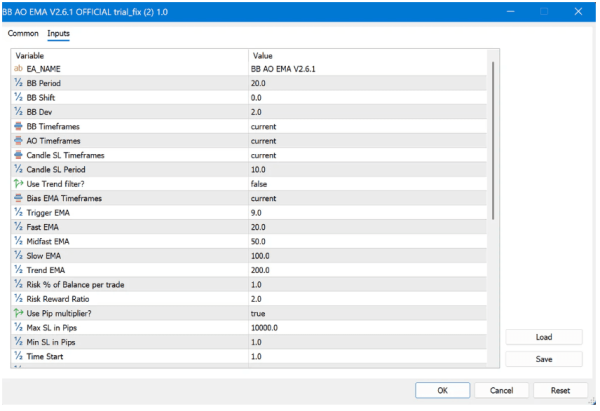
- Set Risk – Define your risk per trade (as a % of account equity).
- Run – Hit Enable and let the EA trade autonomously.
Supported Instruments
- Major Forex pairs (EURUSD, GBPUSD, USDJPY, etc.)
- XAUUSD (Gold)
- Other liquid instruments can be added with custom parameters.
System Requirements
- MetaTrader 5 (MT5) platform.
- Windows or macOS with MT5 installed.
- Stable internet connection for real‑time data.
FAQ
- Is a DLL required?
- No. The EA is fully functional without external DLLs, ensuring compatibility with most broker platforms.
- Can I use it for backtesting?
- Yes, the EA includes a comprehensive backtesting mode with customizable parameters.
- What support is available?
- Contact our support team via email or the support portal for assistance.
Conclusion
BB AO EMA v2.6.1 offers a robust, risk‑managed solution for traders looking to automate trading on MT5 without the pitfalls of aggressive strategies. Its triple‑filter logic, dynamic risk tools, and prop‑friendly safeguards make it suitable for both individual traders and proprietary trading desks seeking consistent, high‑quality entries on major Forex pairs and gold.
Technical Specifications
| Platform | MetaTrader 5 |
| Categories | Prop Firm Expert Advisors, Expert Advisor, Expert Advisors MT5 |
| Strategy | Prop Firm |
| Setfiles | Included |
| Version | V2.6 |
| Delivery | Instant download after checkout |
| Refund Policy | 7 days |
Frequently Asked Questions
Is this an original licensed product?
No — we supply unlocked versions for testing and evaluation, which may differ from the original licensed versions in functionality, compatibility, updates and support. For official licensing and developer support, purchase from the original developer. Read our pre-purchase guide for full details.
How and when do I receive it?
Immediately after checkout: the download link becomes available and you also receive a confirmation email. If anything is missing, contact live support and we will sort it out quickly.
Are setfiles and instructions included?
Yes — the product ships with recommended setfiles and a step-by-step installation guide, so you can go from download to a running terminal in minutes.
What if it does not work with my broker?
Reach out to support before going live: we will help you verify symbol names, account type and settings. And if the product still does not fit your setup, you are covered by our 7-day refund policy.
Ready to automate your trading?
Instant download · Setfiles included · Live support · 7-day refund policy





What others are saying
There are no contributions yet.