

29
Sep
A Beginner's Guide to Mastering MT4 Expert Advisors
Ever watched your charts for hours, waiting for the perfect setup, only to miss it during a bathroom break? You're not alone. That burning frustration of missing trades or staying glued to your screen has pushed countless traders toward automation. Expert Advisors (EAs) promise to solve this problem: but only if you know how to use them properly.
Think of Expert Advisors as your tireless trading assistants that never sleep, never get emotional, and never miss a setup. These automated programs run on MetaTrader 4, executing trades based on predetermined rules while you focus on strategy refinement instead of screen-watching.
What Exactly Are Expert Advisors?
Expert Advisors are sophisticated algorithms written in MetaQuotes Language (MQL) that monitor market conditions 24/7. They analyze price movements, technical indicators, and market patterns to identify trading opportunities according to your specific parameters.
Unlike manual trading where emotions can derail your strategy, EAs stick to the plan religiously. They can simultaneously monitor multiple currency pairs, execute trades with millisecond precision, and manage risk consistently: capabilities that would be impossible for human traders to replicate.
The beauty lies in their versatility. Whether you're trading forex, gold, indices, or cryptocurrencies, a well-designed EA adapts to different market conditions while maintaining your risk parameters.

Your Two Paths: Build or Buy?
Building Your Own EA
Creating custom EAs offers complete control over your trading logic. You'll need to learn MQL programming, which requires significant time investment but rewards you with precisely tailored strategies. MT4's built-in MQL editor provides everything needed to code, test, and deploy your algorithms.
For beginners, start with MT4's Strategy Builder wizard. This visual tool helps construct basic EAs without diving into complex code initially.
Using Pre-Built EAs
Most traders choose ready-made EAs for faster deployment. Quality varies dramatically: from sophisticated algorithms like those found in professional collections to poorly coded systems that drain accounts quickly.
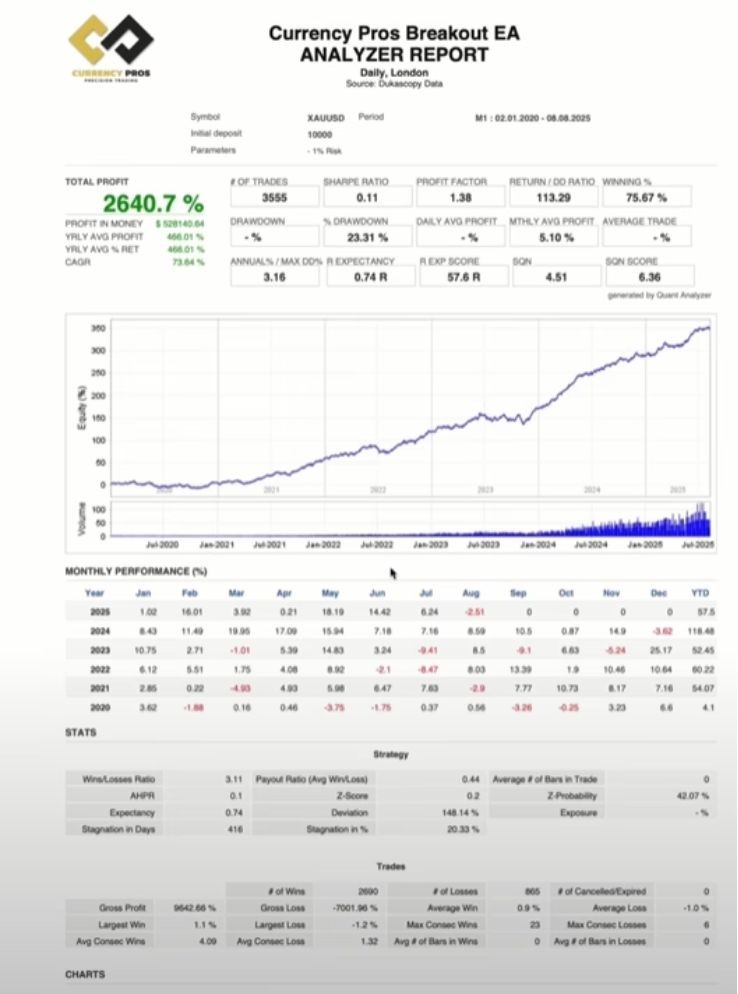
When evaluating pre-built EAs, scrutinize their backtesting results, drawdown statistics, and win rates across different market conditions. Reputable sources provide transparent performance data and ongoing support.
Step-by-Step Installation Guide
Installing EAs correctly determines whether they function as intended or fail catastrophically.
1. Locate Your MT4 Data Folder Navigate to File → Open Data Folder in your MT4 platform. This opens the MetaTrader directory on your computer.
2. Access the Experts Folder Double-click "MQL4" then select the "Experts" folder. This is where all EA files reside.
3. Install Your EA File Copy your EA file (with .ex4 extension) into the Experts folder. Restart MT4 to ensure proper recognition.
4. Activate the EA Drag the EA from the Navigator window's Expert Advisors section onto your desired chart. The settings window opens automatically.
5. Configure Essential Settings In the "Common" tab, check both "Allow Live Trading" and "Allow DLL imports." These permissions are crucial for EA functionality.
6. Enable AutoTrading Click the "AutoTrading" button in MT4's top toolbar. When active, you'll see a green light and potentially a smiley face icon on your chart, confirming the EA is running.
Testing: Your Safety Net
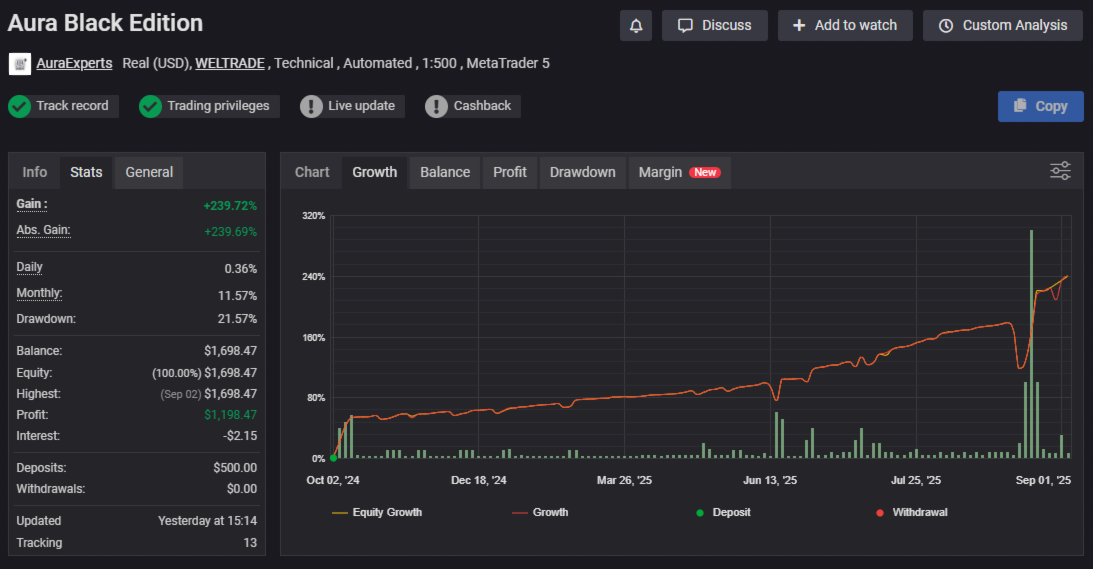
Never deploy an untested EA with real money. Backtesting reveals how your EA performs across various market conditions and time periods.
Strategy Tester Setup Access the Strategy Tester via View → Strategy Tester or press Ctrl+R. Select your EA, choose your preferred currency pair and timeframe, then click "Start."
Optimization Process Use the Optimization tab to fine-tune parameters using historical data. This process identifies the most effective settings for your risk tolerance and trading style.
Run tests across different time periods, including high-volatility events like NFP releases or major economic announcements. According to the Bank for International Settlements, algorithmic trading now accounts for over 75% of forex market volume, making robust testing more critical than ever.
Forward Testing After successful backtesting, run the EA on a demo account for at least one month. This reveals how it performs with live market conditions, spread variations, and execution delays that backtesting can't replicate.
Risk Management Essentials
Even the most sophisticated EA can destroy your account without proper risk controls.
Position Sizing Never risk more than 1-2% of your account per trade. Configure your EA's lot size calculations based on your account balance, not fixed amounts.
Drawdown Limits Set maximum drawdown thresholds. If your EA hits predetermined loss levels, disable it immediately for strategy review.
Broker Compatibility Verify your broker's trading conditions align with your EA's requirements. Some EAs need specific spread conditions, execution speeds, or scalping permissions that certain brokers restrict.
Common Pitfalls to Avoid
Over-Optimization Curve-fitting your EA to historical data creates strategies that perform perfectly in backtests but fail in live markets. Focus on robust parameter ranges rather than precise optimization.
Ignoring Market Conditions Most EAs perform differently across trending, ranging, and volatile markets. Understand your EA's strengths and temporarily disable it during unsuitable conditions.
Set-and-Forget Mentality While EAs reduce hands-on trading, they require ongoing monitoring. Market dynamics evolve, requiring strategy adjustments and performance reviews.
Inadequate Capital Many EAs need sufficient capital to weather drawdown periods and execute their strategies effectively. Insufficient funding leads to premature strategy abandonment during temporary rough patches.
Choosing Quality EAs
Not all Expert Advisors are created equal. Professional-grade EAs like those available through specialized platforms demonstrate transparent performance metrics, provide comprehensive documentation, and offer ongoing support.
Look for EAs with verified trading results, reasonable drawdown statistics (typically under 20%), and consistent performance across different market cycles. Be wary of systems promising unrealistic returns or showing perfect backtesting results: these often indicate over-optimization or data manipulation.

The Path Forward
Mastering MT4 Expert Advisors requires patience, proper testing, and continuous learning. Start with well-documented, professionally developed EAs while building your understanding of automated trading principles.
Remember that EAs amplify your trading strategy's strengths and weaknesses. A poorly conceived strategy won't improve through automation: it will simply lose money faster.
Focus on understanding the market dynamics your chosen EA exploits, maintain realistic expectations about returns and drawdowns, and always prioritize risk management over profit maximization.
The most successful automated traders combine algorithmic precision with strategic oversight, creating a partnership between human judgment and computational efficiency that neither could achieve alone.
Your journey into automated trading starts with a single step: choosing your first EA and testing it thoroughly. The screen-watching days can end, but your commitment to learning and proper implementation determines whether EAs become your trading solution or your trading problem.